TAPPER
The idea was to create a small formfactor MITM - Network TAP that combined with Wireshark and some proper optional Plugins, can go on undetected on any network, whether it’s a switch to switch, router to switch, or intermediary actor between PC’s.Which doesn’t consume power - Completely passive -, is Plug n’ Play,comes in handy for a lot of Network Monitoring operations, IDS / IPS evasions, research.
THEORY OF OPERATION
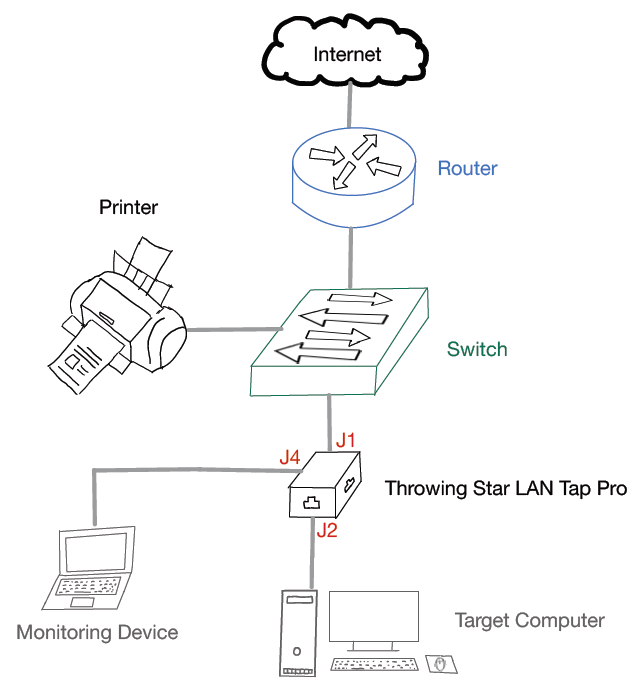
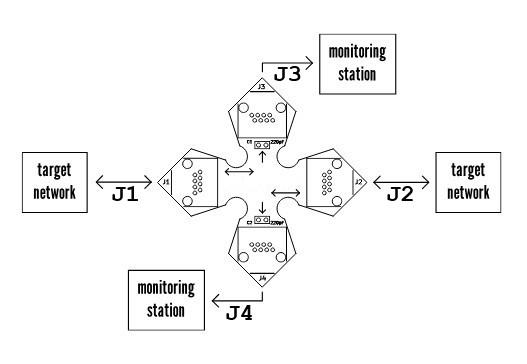
TAPPER is a passive Ethernet tap, requiring no power for operation. There are active methods of tapping Ethernet connections (e.g., a mirror port on a switch), but none can beat passive taps for portability. To the target network, Tapper looks just like a section of cable, but the wires in the cable extend to the monitoring ports in addition to connecting one target port to the other.
It’s a small passive network tap device that sits inline between two Ethernet endpoints and mirrors traffic to a monitoring port (or allows in-line pass-through while capturing).
Typical legitimate uses: troubleshooting, latency/packet-loss analysis, full-duplex passive capture for protocol/debugging, research in controlled environments.
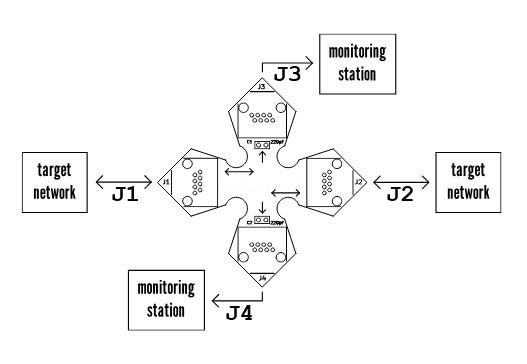
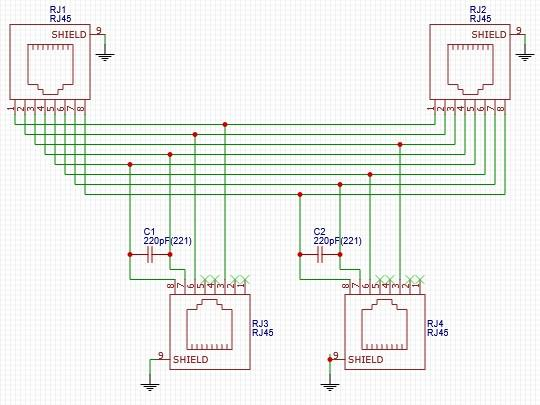
The monitoring ports (J3 and J4) are receive only; they connect to the receive data lines on the monitoring station but do not connect to the station’s transmit lines. This makes it impossible for the monitoring station to accidentally transmit data packets onto the target network.
TAPPER is designed to monitor 10BASE T and 100BASE TX networks. It is not possible for an unpowered tap to perform monitoring of 1000BASE T (Gigabit Ethernet) networks, so it intentionally degrades the quality of 1000BASE T target networks, forcing them to negotiate a lower speed (typically 100BASE TX) that can be passively monitored. This is the purpose of the two capacitors (C1 and C2).
Like all passive LAN Taps, TAPPER degrades signal quality to some extent. Except as described above for Gigabit networks,
this rarely causes problems on the target network. In situations where very long cables are in use, the signal degradation could reduce network performance. It is a good practice to use cables that are not any longer than necessary.
Usage Topology:
SWITCH <—Tap—> TARGET NETWORK
Tap monitoring port —> Monitoring host (capture NIC) Connect TAPPER (J4 AND J3) in line with a target network to be monitored.
Connect one or both monitoring ports (J3 and J4) to ports on one or two monitoring stations. Each port monitors traffic in both directions using a switch we’ll talk about later.
Capture with tcpdump and rotating files (example — run as root or with appropriate privileges):
tcpdump ring buffer (rotate every 1 GB, keep 10 files)
sudo tcpdump -i eth1 -w /var/captures/trace-%Y%m%d-%H%M%S.pcap -C 1024 -W 10 |
OR rotation with timestamps:
while true; do |
Consider dumpcap (part of Wireshark) for lower-overhead capturing on heavy loads or on the long run monitoring sessions.
Use tcpreplay to replay captured traffic against IDS for deterministic testing:
tcpreplay --intf1=eth2 /var/captures/trace-2025*.pcap |
Use display and capture filters (capture filters are BPF, e.g., port 80 or port 443) to limit capture size also Enable Name Resolution cautiously (will slow analysis).
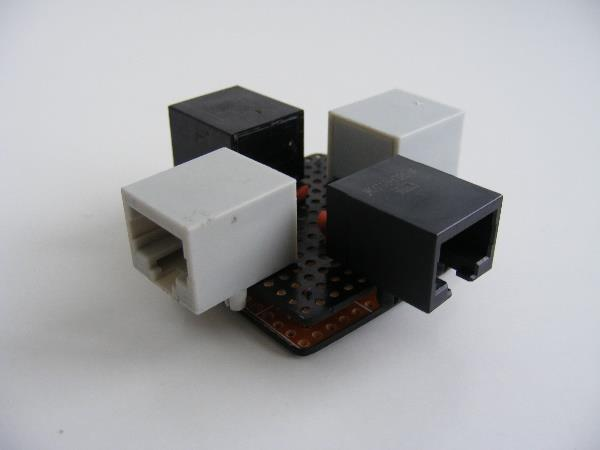
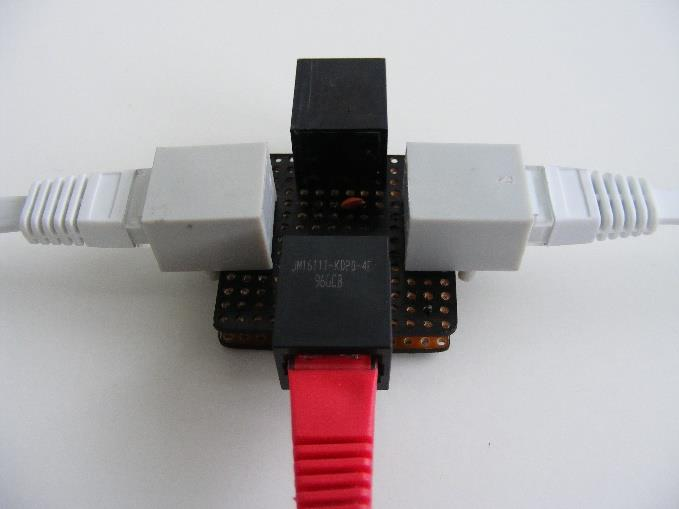
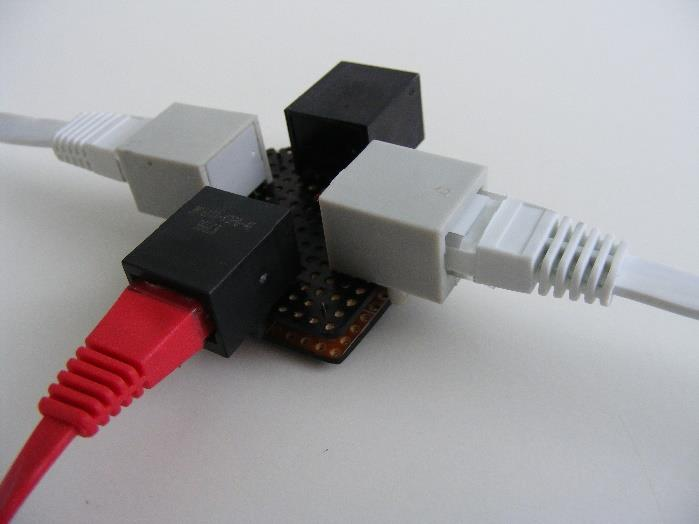
The prototype is messy, because we couldn’t find any place in the country that laser prints double layer PCB’s. It’s all CNC, and with little to no funding, we had to improvise a little. That might not be your case, so you can definitely improve the overall shape / design of the tapper, make it even as small as a keychain, as intended in the original design blueprints / schematics.
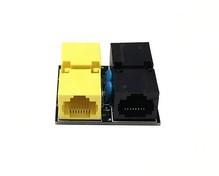
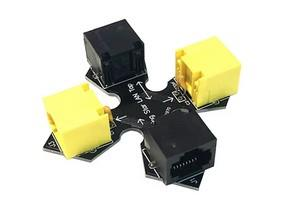
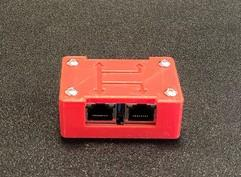
Also, made a simple mod that allows the fast switch between listen ports without having to plug and unplug the MITM cable, it’s like an ON/OFF toggle switch but it doesn’t turn off, it just toggles between sending / receiving sides with minimal physical interference, you’d just have to play around a little bit according to your wiring schema with crocodile clips and jumper wires.
ASSEMBLY INSTRUCTIONS
1- Gather the components. You should have one TAPPER printed circuit board, four Amphenol RJHSE 5080 modular connectors, and two 220 pF capacitors with 0.1 inch lead spacing such as the Xicon 140 50P2 221K RC. You will also need a soldering iron, some electrical solder, and a pair of wire cutters.
2- Insert the four modular connectors (J1, J2, J3, and J4) into the printed circuit board. Be careful that each of the leads extends through the circuit board before snapping the connector fully into place.
3- Solder the eight leads of each connector.
4- Insert the two capacitors (C1 and C2) through the circuit board. It is helpful to slightly bend the leads on the underside of the board so that the capacitors stay in place when the board is turned over.
5- Solder both leads of each capacitor and clip off the excess with wire cutters.
6- Clean the flux from the board. Depending on the type of solder used, you might need water, alcohol, or other solvents. A toothbrush can make this job easier. Allow the board to dry before use.
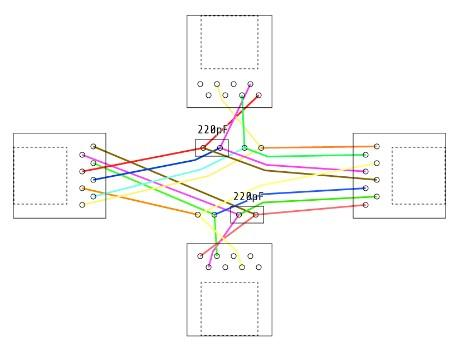
But these instructions are for the already printed / existing TAPPER blueprints, in our case we couldn’t find a laser CNC machine that could perform such cuts on double sheeted PCB’s, so we used prototype breadboards
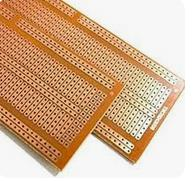
And referred to the wiring schematics to solder it manually, I know it’s a tough one, and is not a beginner friendly when it comes to holding pieces together, but it’s the only choice at hands.
One can also add an extra layer of protection by covering the soldered wires with an extra sheet of PCB of the same size, just to make sure everything is held together firmly
Variations of performed tasks on Target Network / Target Computers
For capturing various packets, several different kinds of programs and usages were performed on the target computer, which are listed in the following points:
- Browser Usage with HTTP-websites
- Browser Usage with HTTPS-websites
- VPN Connection
- Checking emails with Outlook in the browser
- Watching videos in the browser (https-websites)
- Printing PDFs on the connected printer in the network
- Listening to music with Spotify
- Identify potential security threats
- Monitor network traffic for performance analysis
- Analyze network traffic for security vulnerabilities
- Detect and investigate potential security incidents
- Identify and troubleshoot network issues
- Evaluate and ensure the quality of network service
- Analyze data to optimize network performance
- Monitor for suspicious or unauthorized activities on the network
Nowadays, every secure website uses HTTPS for communication over a computer network. It is also called HTTP over TLS, because the communication protocol is encrypted using TLS (Transport Layer Security). The packets that are captured in Wireshark need to be inspected properly and in detail, because packet analysis is more complex since most internet traffic is encrypted and applications commonly use encryption based on TLS as well. Only if the HTTP-protocol is used, the information can be sniffed easier. As an example, data/information that is shown in the Wireshark captures for TCP communication with HTTPS on top. These are one of the most important protocols for the mentioned use-cases described in the previous stage.
- Source IP and Destination IP
- Source Port and Destination Port
- Source MAC and Destination MAC
- Round Trip Time (RTT) between client and server
- Time to live (TTL) - which indicates the hops between client and server
- TCP windows and flags
- Sessions
- Packets, Data, Payload
- Retransmissions
Getting this basic metadata, which actually provides information about other data, with the TAPPER is really powerful, because today, data is everything. Algorithms and systems can be used to extract insights and knowledge from this unstructured and structured data. Implementing the sniffing device in corporate networks provides powerful information about companies, their whereabouts, knowledge, views and a lot more. Extracting useful information from the data is very important for data mining, which can give companies competitive advantages through statistics and predictions on basis of the given data.
Example Results
I. Classic HTTP cleartext capture
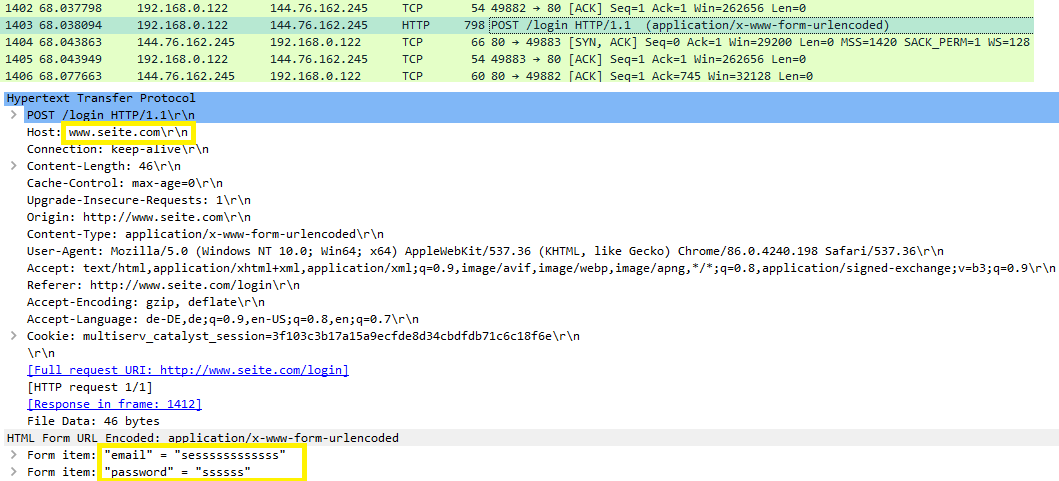
The following figures show examples of which kind of information can be sniffed with the TAPPER. The target computer has the IP-address 192.168.0.122. The screenshots are taken from the Wireshark capture of the monitoring device. The first example shows what kind of things are possible to see, if the HTTP-protocol is used. The login data can be read in cleartext, which is marked together with the host with a yellow rectangle.
II. Printing PDFs on the connected printer in the network
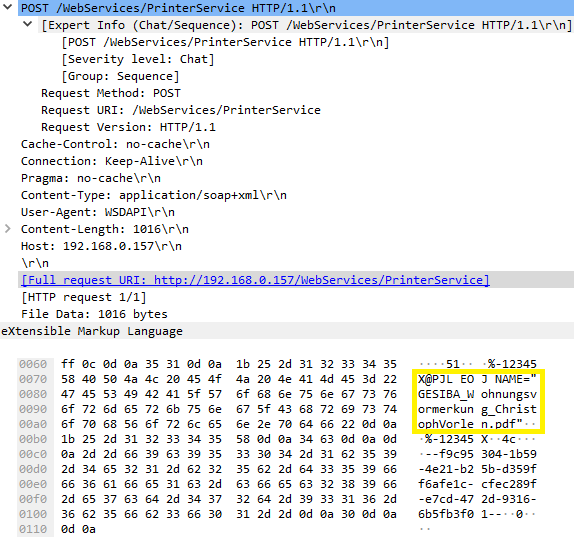
The second packet capture example of Wireshark in the following figure shows that a document was printed on the printer, which is available in the Local Area Network (LAN). The document name can be seen in cleartext in the Wireshark packet capture, highlighted with a yellow rectangle.
III. ICMP ECHO / Ping Requests
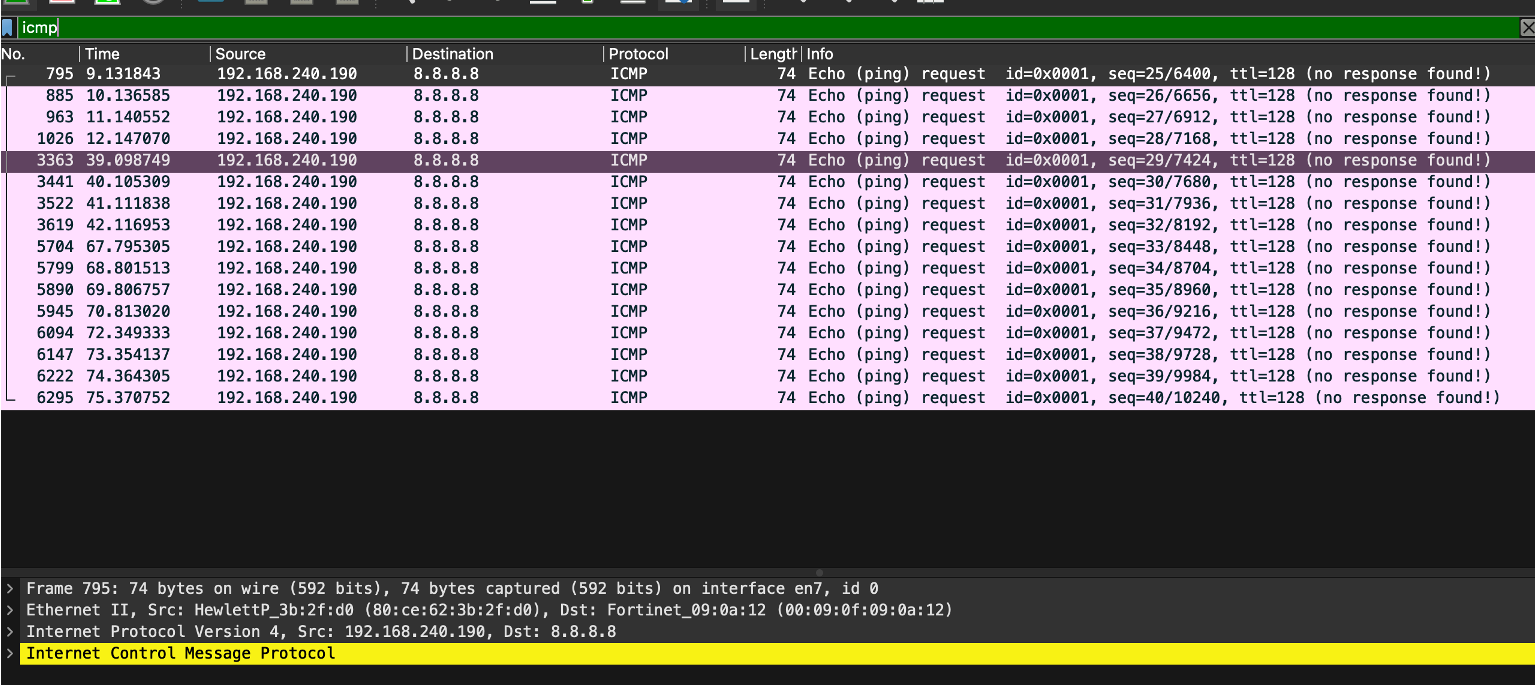
The third packet capture example of Wireshark in the following figure shows that aping command was executed on the target computer with the IP adddress 192.168.240.190. ICMP echo requests are sent, which can be captured in Wireshark on the monitoring device, as seen in the following image.
Summary of the important aspects:
All captured packets in Wireshark provide data like the listed bullet points above for TCP with HTTPS on top. It is important to mention that the most data can be seen during connection/3-way-handshake or at the beginning of a session or transaction , After the initiation process and data starts flowing, only the payload can be seen, which does not provide more than encrypted payload packets with source and destination, length/size and the used protocol.
As an example, for a network administrator it is possible to use data such as Source/Destination IP, Source/Destination MAC and the protocols to easily comprehend what the devices or users in the target network are up to and with whom they are communicating. It is important to remember that nowadays several protocols in use ensure security for the packets sent over a network.
Therefore, traffic sniffing by using a device such as the TAPPER becomes more difficult with Wireshark, but it is still possible to see loads of information and metadata.
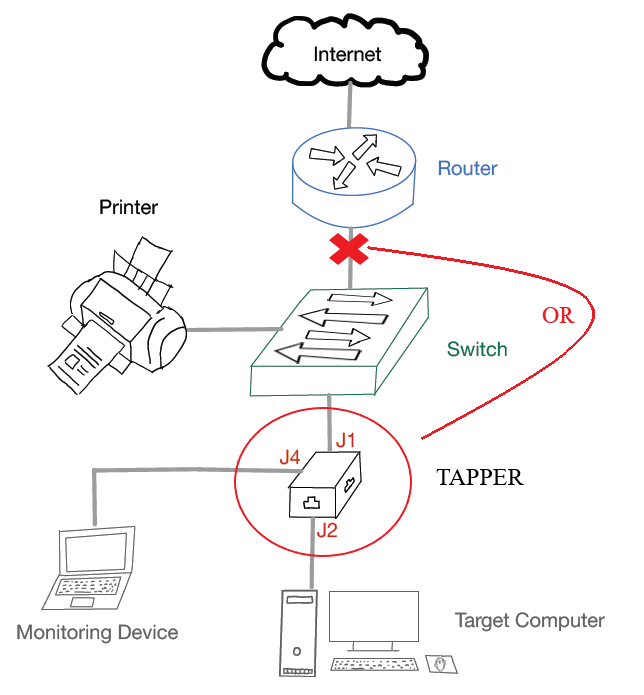
These can be used to inspect and learn a lot about the target network and are really powerful to a network administrator or for illegally obtained access to the network from a hacker, With a high number of IoT devices connected to a Local Area Network via Ethernet, the TAPPER LAN Tap can be used very successfully by installing it in the right place in the network, for example between the switch and router.
If all IoT devices are directly connected to the switch, all traffic that is sent to the router can be sniffed on the monitoring port, without any of the IoT devices knowing about this. For network administrators this can be a very powerful tool to find flaws and problems or inspect the network in detail.
Important Take-Aways:
- TAPPER LAN Tap is a device for passive LAN traffic sniffing and is a really powerful tool for network administrators.
- Nowadays, several protocols in use ensure security for the packets sent over a network. Traffic sniffing therefore becomes more difficult with Wireshark,
but it is still possible to see loads of information and metadata. Stealing confidential data is not the primary goal nowadays. - Algorithms and systems can be used to extract insights and knowledge from these unstructured and structured data. Extracting useful information from this data is very important for data mining, which can give companies competitive advantages through statistics and predictions on basis of the given data.
- The device is transparent to the network, so it doesn’t alter the flow of data or introduce laten
REFRENCES & RESOURCES
- https://greatscottgadgets.com/throwingstar/
- https://scheible.it/throwing-star-lan-tap-pro/
- https://github.com/greatscottgadgets/throwing-star-lan-tap
- https://easyeda.com/editor-id=!4965ef5f501d420aa1c03b4808becc58
- https://web.archive.org/web/20240526233347/https://accedian.com/bloghow-todecrypt-an-https-exchange-with-wireshark/
- Hessel Schut, Mark Scanlon, Jason Farina, and Nhien-An Le-Khac. Towardsthe Forensic Identification and Investigation of Cloud Hosted Servers through Non-Invasive Wiretaps. 08/2015
- V. Ribeiro, A. Rocha, R. Peixoto, F. Portela, and M. F. Santos. Importance ofstatistics for data mining and data science. In 2017. 5th International Conference on Future Internet of Things and Cloud Workshops (FiCloudW), pages 156-163, 2017.
- T. Scheible, Hardware & Security Werkzeuge, Pentesting, Prävention. Bonn: Rheinwerk, pages 470-474 2022.
- Michael Kofler, Klaus Gebeshuber, Peter Kloep, Frank Neugebauer, Andr´e Zingsheim, Thomas Hackner, Markus Widl, Roland Aigner, Stefan Kania, Tobias Scheible, and Matthias W¨ubbeling. Hacking and security: The Comprehensive guide to penetration testing and cybersecurity. SAP Press, 2023