- x86 Intel Assembly
- Portable Executable File Format
- WinDBG
- WinDbg Automation with Python
- IDA
- Stack Overflows
- SEH Overflows
- Egghunters
- Reverse Engineering For Bugs
- DEP Bypass
- ASLR Bypass
- Format Strings Vulnerabilities
- Practicing
By Zeyad Azima
x86 Intel Assembly
| Register Name | Acronym | 16-bit | 8-bit High | 8-bit Low | Description |
|---|---|---|---|---|---|
| Extended Accumulator Register | EAX | AX | AH | AL | Primarily used for arithmetic operations. Often stores the return value of a function. |
| Extended Base Register | EBX | BX | BH | BL | Can be used as a pointer to data (especially with the use of the SIB byte, or for local variables in some cases). |
| Extended Counter Register | ECX | CX | CH | CL | Commonly used for loop counters in iterative operations. |
| Extended Data Register | EDX | DX | DH | DL | Used in arithmetic operations alongside EAX for multiplication and division, and can hold the overflow result. |
| Extended Source Index | ESI | SI | SIL | N/A | Commonly used as a pointer to the source in stream operations (e.g., string operations). |
| Extended Destination Index | EDI | DI | DIL | N/A | Commonly used as a pointer to the destination in stream operations (e.g., string operations). |
| Extended Base Pointer | EBP | BP | BPL | N/A | Used to point to the base of the stack, and often references local function variables and function call return addresses. |
| Extended Stack Pointer | ESP | SP | SPL | N/A | Points to the top of the stack and adjusts automatically as values are pushed to or popped from the stack. |
Note: The 8-bit high and low byte registers (like AH, AL) are available for the original four general-purpose registers (AX, BX, CX, DX). The extended registers ESI, EDI, EBP, and ESP do not have corresponding 8-bit registers. Similarly, there aren’t 4-bit versions of these registers in x86 architecture.can be split similarly, but without the higher 8-bit references.
- eFLAGS:
| BIT | LABEL | DESCRIPTION |
|---|---|---|
| 0 | CF | Carry flag |
| 2 | PF | Parity flag |
| 6 | ZF | Zero flag |
| 7 | SF | Sign flag |
| 11 | OF | Overflow flag |
The stack
- The stack is a memory location used by functions to store local variables. The stack is such a common construct that there are specific assembly instructions to interact with it. Stack grow in an oppiste way if we add data to the stack it grows by
-4and if we removed the data it will grow+4.
Data Size
Before we cover the assembly instructions, let’s review some common data sizes we might encounter.
| NAME | BYTE LENGTH |
|---|---|
| byte | 1 |
| word | 2 |
| dword (double word) | 4 |
| qword (quad word) | 8 |
Instructions
| Category | Instruction | Description | Example | Explanation |
|---|---|---|---|---|
| Copying Data | ||||
| MOV | Moves data between the source operand and the destination operand | MOV EAX, 5 |
Copies the value 5 into the EAX register. |
|
| LEA | Loads the effective address of the source operand into the destination register | LEA EAX, [EBX+8] |
Computes the address EBX + 8 and stores it in EAX. |
|
| Working on the Stack | ||||
| PUSH | Pushes the source operand onto the stack | PUSH EAX |
Pushes the value in EAX onto the top of the stack. |
|
| POP | Pops the top of the stack into the destination operand | POP EAX |
Pops the top value from the stack into EAX. |
|
| Arithmetic Operations | ||||
| INC | Increments the operand by 1 | INC EAX |
Adds 1 to the value in EAX. |
|
| DEC | Decrements the operand by 1 | DEC EAX |
Subtracts 1 from the value in EAX. |
|
| ADD | Adds the source operand to the destination operand | ADD EAX, EBX |
Adds the value in EBX to the value in EAX and stores the result in EAX. |
|
| SUB | Subtracts the source operand from the destination operand | SUB EAX, EBX |
Subtracts the value in EBX from EAX and stores the result in EAX. |
|
| MUL | Multiplies the source operand with the destination operand | MUL EBX |
Multiplies EAX by EBX and stores the result in EAX (lower half) and EDX (upper half). |
|
| DIV | Divides the source operand by the destination operand | DIV EBX |
Divides EAX by EBX, with the quotient in EAX and remainder in EDX. |
|
| Logic Operations | ||||
| AND | Logical AND operation between two operands | AND EAX, EBX |
Performs a bitwise AND between EAX and EBX and stores the result in EAX. |
|
| OR | Logical OR operation between two operands | OR EAX, EBX |
Performs a bitwise OR between EAX and EBX and stores the result in EAX. |
|
| XOR | Logical XOR operation between two operands | XOR EAX, EBX |
Performs a bitwise XOR between EAX and EBX and stores the result in EAX. |
|
| NOT | Logical NOT operation on the operand | NOT EAX |
Inverts all the bits in EAX. |
|
| Basic Control Flow | ||||
| CALL | Calls a procedure | CALL procedureName |
Jumps to the label procedureName and pushes the next instruction’s address onto the stack. |
|
| RET | Returns from a procedure | RET |
Pops the top of the stack into the instruction pointer, resuming execution after the last CALL. |
|
| JMP | Unconditional jump to a label or address | JMP label |
Jumps to the address or label specified without condition. | |
| Comparisons and Conditional Jumps | ||||
| TEST | Logical AND operation between two operands without storing the result | TEST EAX, EAX |
Performs a bitwise AND between EAX and EAX without saving the result, typically used to set flags. |
|
| CMP | Compares two operands by subtracting them and setting the flags | CMP EAX, EBX |
Subtracts EBX from EAX without storing the result and updates the flags based on the result. |
|
| Jxx | Conditional jump based on the set flags, where xx can be various conditions like JE, JNE, JG, JL, etc. | JE label |
Jumps to the label if the last comparison was equal. |
Examples
Code:
MOV EAX, ESP |
Explanation:
MOV EAX, ESP:- This instruction moves the current value of the stack pointer (held in the
ESPregister) into theEAXregister.
- This instruction moves the current value of the stack pointer (held in the
MOV EBX, 0x33:- The value
0x33is moved directly into theEBXregister.
- The value
LEA EBX, [EBX + 0x10]:- The
LEA(Load Effective Address) instruction computes the address of the second operand and stores it in the first operand. In this case, it adds0x10to the current value ofEBXand then stores the result back inEBX.
- The
MOV DWORD [EAX], EBX:- This instruction moves the value in
EBXto the memory address pointed to byEAX. TheDWORDspecifies that it’s a double word (32 bits) operation. The brackets[EAX]mean “the memory address contained in EAX”.
- This instruction moves the value in
MOV ECX, DWORD [EAX]:- The value from the memory address pointed to by
EAXis moved into theECXregister. Again, the use ofDWORDspecifies a 32-bit operation.
- The value from the memory address pointed to by
MOV EDX, 2:- The value
2is moved directly into theEDXregister.
- The value
LEA ECX, [ECX + EDX]Let’s dissect it:
Destination (
ECX): This is the register where we want to store the computed address.Source (
[ECX + EDX]): This is the effective address we want to compute. The square brackets[]don’t mean we’re fetching data from memory here. Instead, they are used to indicate an address computation. The instruction calculates the sum of the values in theECXandEDXregisters.
Key Points about the [] brackets in assembly:
- In x86 assembly, the square brackets
[]are used to denote memory addressing. When a register (or an immediate value, or a combination of both) is enclosed in these brackets, it means the value at the memory address contained in that register (or specified by the immediate value). - It’s a way to reference memory locations directly.
- For example,
MOV ECX, DWORD [EAX]means “move the 32-bit value located at the memory address contained in theEAXregister into theECXregister.
- Instructions for Unsigned Comparison
| Instruction | Name |
|---|---|
| JE/JZ | Jump if Equal or Jump if Zero |
| JNE/JNZ | Jump if not Equal / Jump if Not Zero |
| JA/JNBE | Jump if Above / Jump if Not Below or Equal |
| JAE/JNB | Jump if Above or Equal / Jump if Not Below |
| JB/JNAE | Jump if Below / Jump if Not Above or Equal |
| JBE/JNA | Jump if Below or Equal / Jump if Not Above |
- Instructions for signed number comparisons
| Instruction | Name |
|---|---|
| JE/JZ | Jump if Equal or Jump if Zero |
| JNE/JNZ | Jump if not Equal / Jump if Not Zero |
| JG/JNLE | Jump if Greater / Jump if Not Less or Equal |
| JGE/JNL | Jump if Greater / Equal or Jump Not Less |
| JL/JNGE | Jump if Less / Jump if Not Greater or Equal |
| JLE/JNG | Jump if Less or Equal / Jump Not Greater |
Portable Executable File Format
PE Structe
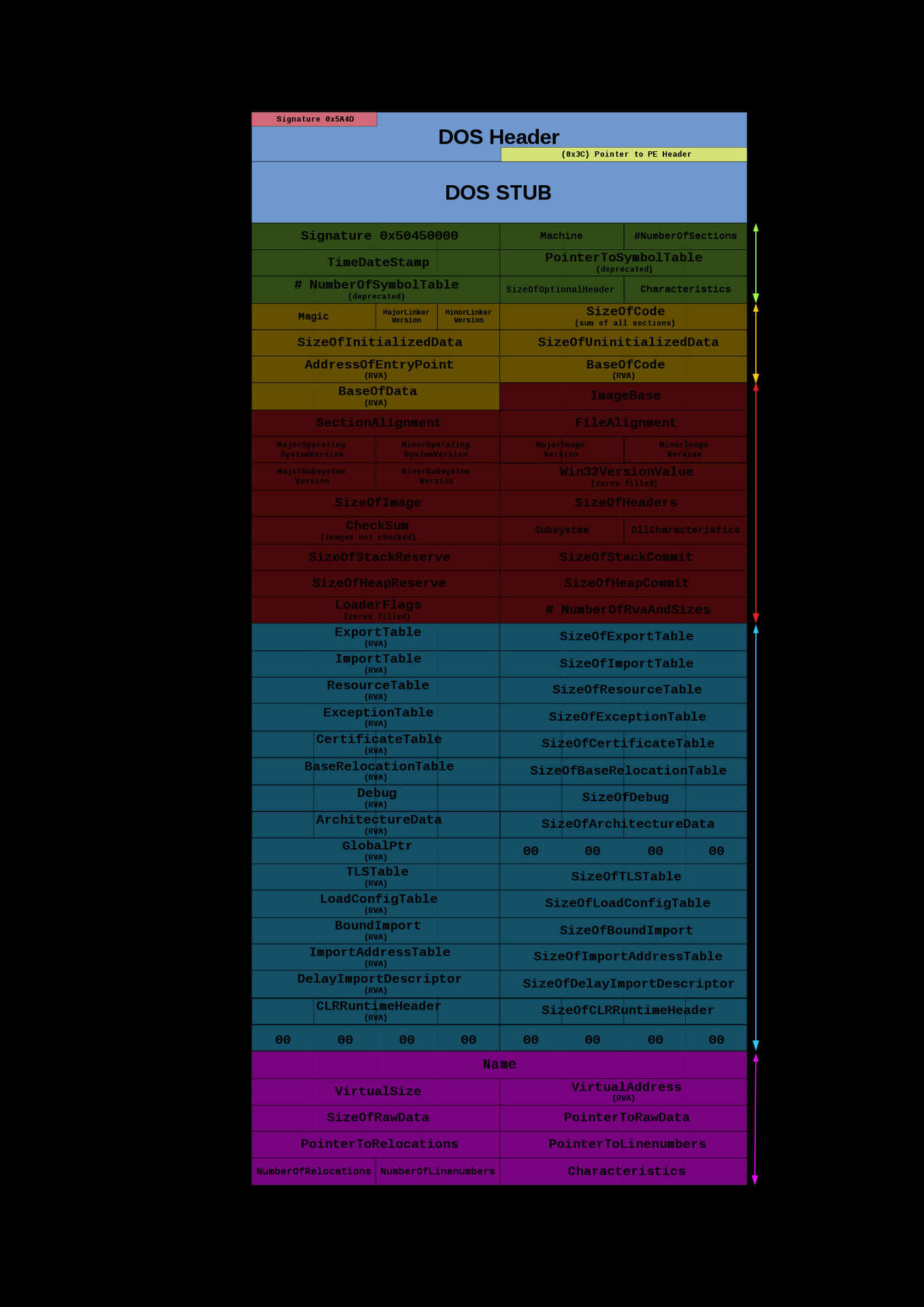
Introduction
Portability in PE Context:
- “Portable” refers to the PE file format’s versatility across different CPU architectures and Windows versions.
- Supports architectures like x86, x86-64, IA64, ARM, ARM64, and MIPS.
Architecture Specificity:
- An executable is designed for a specific architecture and can only be executed on compatible systems.
PE Format Versions:
- PE32 for 32-bit systems and PE32+ for 64-bit systems.
- PE32+ differs by missing one field from PE32 and has some fields widened for 64-bit support.
File Types in PE Format:
COFF File/Object File (.obj):
- Created by compilers from source code.
- Not executable by itself, used as input for linkers to create an executable.
PE File/Executable/Image File:
- Produced by the linker, containing executable code and data.
- Executable on its own, mapped to memory when run.
Subtypes of PE Files:
Dynamic Link Library (DLL) (.dll):
- Contains code and data for shared use by multiple programs.
- Not directly runnable on its own.
Executable File (.exe):
- Can be directly run on its own.
Terminology Clarification:
- “PE file” or “PE image” refers to both DLLs and executables collectively.
- “Executable” specifically refers to files that can run on their own, typically with .exe extension.
Footnotes:
- A reference to official documentation for supported architectures is mentioned.
- Compilers that are compatible with Windows create COFF files.
- Linkers use object files to create an executable.
- DLLs allow multiple programs to use the same code and data.
- Executables are standalone and can be launched by the user.
File Headers
1. MS-DOS Header
The MS-DOS header includes the IMAGE_DOS_HEADER structure:
typedef struct _IMAGE_DOS_HEADER { WORD e_magic; // Magic number ... LONG e_lfanew; // File address of new exe header } IMAGE_DOS_HEADER, *PIMAGE_DOS_HEADER; |
The e_magic field should contain 0x5A4D, which corresponds to “MZ” in ASCII. The e_lfanew field contains the file offset to the PE header.
Example Calculation: If e_lfanew is 0xF0, this means the PE header starts at byte offset 0xF0 from the beginning of the file.
2. PE and File Headers
The PE header begins with a signature, followed by the IMAGE_FILE_HEADER:
typedef struct _IMAGE_NT_HEADERS { DWORD Signature; IMAGE_FILE_HEADER FileHeader; ... } IMAGE_NT_HEADERS32, *PIMAGE_NT_HEADERS32; |
Example Calculation: If the PE signature is 0x00004550, this corresponds to “PE\0\0” in ASCII.
3. Optional Header
The IMAGE_OPTIONAL_HEADER provides more detailed information:
typedef struct _IMAGE_OPTIONAL_HEADER { ... DWORD AddressOfEntryPoint; DWORD BaseOfCode; ... DWORD ImageBase; DWORD SectionAlignment; DWORD FileAlignment; ... DWORD SizeOfImage; DWORD SizeOfHeaders; ... } IMAGE_OPTIONAL_HEADER32, *PIMAGE_OPTIONAL_HEADER32; |
Key Fields and Calculations:
AddressOfEntryPoint: The starting point of the program when executed.BaseOfCode: The starting address of the code section when loaded into memory.ImageBase: The preferred address of the first byte of the image when loaded into memory.SectionAlignment: How sections are aligned in memory.FileAlignment: How sections are aligned in the file on disk.SizeOfImage: Total size of the image in memory, rounded toSectionAlignment.SizeOfHeaders: Total size of all headers, rounded toFileAlignment.
Example Calculations:
- If
ImageBaseis0x400000andAddressOfEntryPointis0x1000, the VA of the entry point is0x400000+0x1000=0x4010000x400000+0x1000=0x401000. - If
SectionAlignmentis0x1000, sections start at memory addresses that are multiples of0x1000. - If
SizeOfImageis0x16000, the image takes up0x16000bytes in memory.
4. Data Directory
The data directory entries point to various important tables and arrays:
typedef struct _IMAGE_OPTIONAL_HEADER { ... DWORD NumberOfRvaAndSizes; IMAGE_DATA_DIRECTORY DataDirectory[16]; } IMAGE_OPTIONAL_HEADER32, *PIMAGE_OPTIONAL_HEADER32; |
Example Calculation:
- If the
Import Directoryhas an RVA of0x123DCand theImageBaseis0x400000, the VA of the import directory is 0x400000+0x123DC=0x4123DC0x400000+0x123DC=0x4123DC.
5. Alignment and Address Calculation Examples
- For
SectionAlignment0x10000x1000, the .text section RVA 0x10000x1000 implies a VA of 0x400000+0x1000=0x4010000x400000+0x1000=0x401000. - For
FileAlignment0x2000x200, the file offset of the .text section 0x4000x400 aligns with this value since 0x4000x400 is a multiple of 0x2000x200. - The difference between file offset and RVA for the entry point is due to these alignments. If the file offset for the entry point is 0x66A0x66A and the .text section offset is 0x4000x400, the RVA offset is
0x66A−0x400=0x26A0x66A−0x400=0x26A.
Section Headers & Sections
Overview
The Section Table in a PE file provides details about the file’s sections. The number of entries in the Section Table corresponds to the number of sections in the PE file, which is specified by the NumberOfSections field in the File Header.
Locating the Section Table
To locate the Section Table:
Start at the DOS Header to find
e_lfanew, the file offset to the NT Headers (0xF8in the example).The File Header follows the PE Signature in the NT Headers. Since the PE Signature is a DWORD (4 bytes), the File Header starts at the file offset
0xFC.Calculate the size of the File Header. It consists of 4 WORDs and 3 DWORDs:
`Size of File Header=(4×2)+(3×4)=20 bytes=0x14 (hex)Size of File Header=(4×2)+(3×4)=20 bytes=0x14 (hex)``
Add the size of the File Header to its offset to find the start of the Optional Header:
0xFC+0x14=0x1100xFC+0x14=0x110
Add the size of the Optional Header (
0xE0in the example) to the file offset of the Optional Header to get the start of the Section Table:0x110+0xE0=0x1F00x110+0xE0=0x1F0
Section Headers
The IMAGE_SECTION_HEADER structure defines each entry in the Section Table:
|
Calculations for Section Headers
VirtualSize(e.g.,0xB1E8for.textsection) is the size of the section when loaded into memory.VirtualAddress(e.g.,0x1000for.textsection) is the RVA for the first byte of the section.Calculate the Virtual Address by adding the RVA to the Image Base (
0x400000in the example):0x400000+0x1000=0x4010000x400000+0x1000=0x401000PointerToRawData(e.g.,0x400for.textsection) is the file offset for the beginning of the section on disk.SizeOfRawData(e.g.,0xB200for.textsection) is the size of the section’s initialized data on disk.
Characteristics and Flags
The Characteristics field contains flags indicating the section’s attributes. For instance, 0x60000020 indicates:
0x40000000(IMAGE_SCN_MEM_READ): Section can be read.0x20000000(IMAGE_SCN_MEM_EXECUTE): Section can be executed.0x00000020(IMAGE_SCN_CNT_CODE): Section contains executable code.
Section Padding and Boundaries
Padding with null bytes occurs between sections if SizeOfRawData is larger than VirtualSize. The end of a section on disk is calculated by adding PointerToRawData and SizeOfRawData.
Standard Sections
.text: Contains executable code..data: Contains initialized variables..bss: Contains uninitialized variables..rdata: Contains read-only constants..rsrc: Contains resources like icons, bitmaps, etc..reloc: Contains relocation data..edata: Contains exported symbols..idata: Contains imported symbols information.
Export and Import Directories
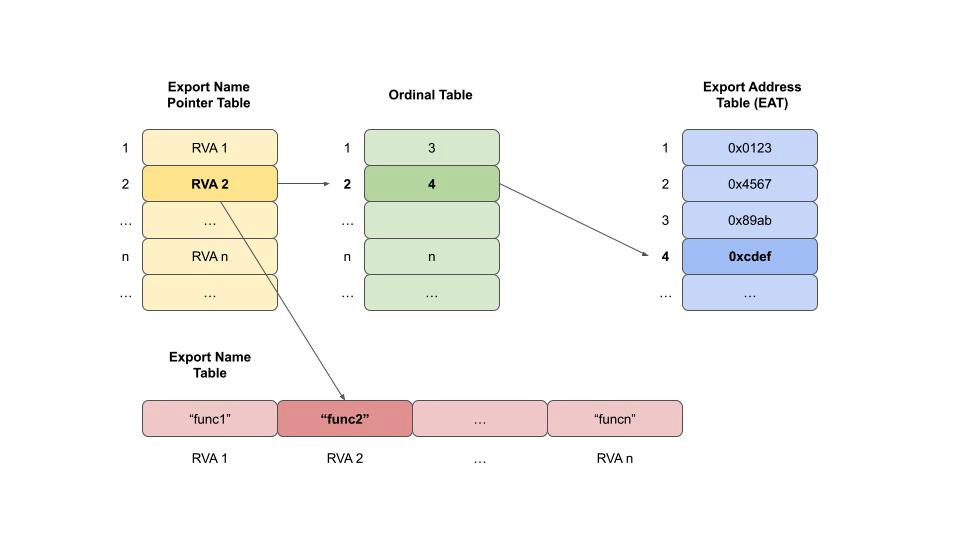
- Export Directory (
IMAGE_EXPORT_DIRECTORY) contains addresses and names of exported symbols. - Import Directory (
IMAGE_IMPORT_DESCRIPTOR) contains references to the Import Address Table (IAT) and Import Lookup Table (ILT).
IMAGE_EXPORT_DIRECTORY
The IMAGE_EXPORT_DIRECTORY structure is an integral part of the PE (Portable Executable) format in Windows, and it contains information about the exported functions of a DLL (Dynamic Link Library) or EXE (Executable file). Let’s break down the structure and its purpose:
- Characteristics: This field is reserved and typically set to zero.
- TimeDateStamp: The time and date the export data was created.
- MajorVersion and MinorVersion: Version number of the export data. Not commonly used.
- Name: The RVA (Relative Virtual Address) of the DLL or EXE name.
- Base: The starting ordinal number for exports in this image. Often set to 1.
- NumberOfFunctions: The number of entries in the Export Address Table (EAT).
- NumberOfNames: The number of entries in the Export Name Pointer Table (which can be different from NumberOfFunctions if not all functions are named).
- AddressOfFunctions: The RVA to the Export Address Table (EAT), which contains RVAs to the actual exported functions.
- AddressOfNames: The RVA to the Export Name Pointer Table, which contains RVAs to the string names of the exported functions.
- AddressOfNameOrdinals: The RVA to the Ordinal Table, which maps the ordinals to the indexes in the Export Address Table.
Here’s how these elements work together:
Export Address Table (EAT): This table contains the actual addresses (RVAs) of the exported functions. When a program wants to call an exported function, it looks up this table to find the address to jump to.
Export Name Pointer Table: This table contains RVAs to the names of the exported functions. Not all functions need to have names; some can be exported by ordinal only.
Ordinal Table: This table contains the ordinals (which are like indexes) of the exported functions. Each ordinal corresponds to an entry in the Export Address Table.
IMAGE_IMPORT_BY_NAME
The IMAGE_IMPORT_BY_NAME structure is used in the import process of a Windows Portable Executable (PE) format. This structure is part of the Import Table, which is used to resolve addresses of functions that are imported from other DLLs. Let’s break down the structure:
Hint: A hint is an index into the Export Name Pointer Table of the DLL from which the function is imported. It’s called a “hint” because it’s not guaranteed to be correct, but it’s used as a starting point to speed up the lookup of the function’s address. If the hint points to the correct name in the Export Name Pointer Table, the loader can quickly get the address of the function. If it’s incorrect, the loader will search the Export Name Pointer Table for the right name.
Name: An array of characters that represents a null-terminated ASCII string. This is the name of the function to be imported. The array is declared with only one element (
CHAR Name[1];), but this is a common C technique for creating a flexible-sized array. In memory, the name field contains the full name of the function, followed by a null terminator.
When the PE loader is resolving imports, it will use the following process:
The loader looks at the
Hintvalue in theIMAGE_IMPORT_BY_NAMEstructure for a given imported function.It goes to the Export Name Pointer Table of the DLL specified by the import and checks the function name at the hint index.
If the name at the hint index matches the
Namein theIMAGE_IMPORT_BY_NAME, the loader uses this information to resolve the address of the function quickly.If the hint is incorrect, the loader searches through the Export Name Pointer Table to find the correct entry that matches the
Name.Once the correct name is found, the loader retrieves the corresponding ordinal from the Export Ordinal Table.
The ordinal is used to index into the Export Address Table to get the actual address (RVA) of the function.
Finally, the loader writes the resolved address into the Import Address Table (IAT) of the importing executable, overwriting the placeholder that was there during compilation.
Binding and IAT
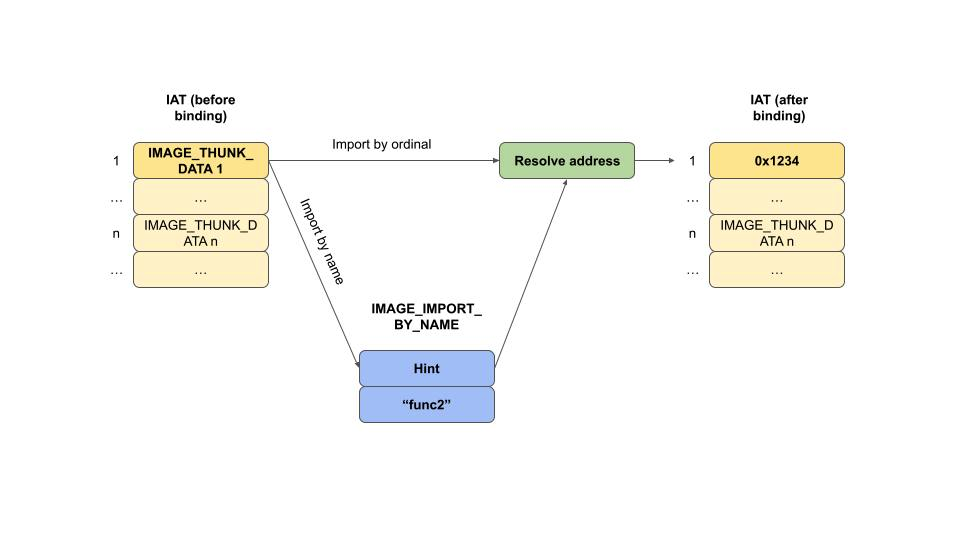
Binding resolves the addresses of imported functions and updates the IAT. The loader changes page attributes to writeable during the binding process to update the IAT, even if it is part of a read-only section like .rdata.
Notes:
Imported symbols can be referenced in two primary ways:
1- By Name: The executable contains an import directory with an entry for each imported function or variable. This entry includes a hint and the name of the import, as described by the
IMAGE_IMPORT_BY_NAMEstructure.2- By Ordinal: Instead of using a name, the executable can import functions using their ordinal numbers. This method does not require the importing executable to know the names of the functions, just their ordinal positions within the export table of the DLL.
Calculation Examples
- The file offset of the end of the
.textsection is calculated as:
Offset of ‘.text‘+Size of ‘.text‘=0x400+0xB200=0xB600Offset of ‘.text‘+Size of ‘.text‘=0x400+0xB200=0xB600
The Virtual Address of the
.textsection is calculated by adding its RVA to the base address:Base Address+RVA of ‘.text‘=
0x400000+0x1000=0x401000Base Address+RVAof ‘.text‘=0x400000+0x1000=0x401000
Inspect PE using WinDBG
| PE Structure Component | WinDbg Command | Description |
|---|---|---|
| DOS Header | dt _IMAGE_DOS_HEADER <address> |
Displays the DOS header structure. |
| NT Headers | !dh <ModuleName> |
Displays the NT headers, including the file header and optional header. |
| File Header | dt _IMAGE_FILE_HEADER <address> |
Displays the file header with machine type and number of sections. |
| Optional Header | dt _IMAGE_OPTIONAL_HEADER <address> |
Displays the optional header, including entry point and image base. |
| Section Headers | !dh -f/-s <ModuleName> |
Displays the file headers and section headers. |
| Export Directory | !dh -e <ModuleName> |
Displays the export directory of a module. |
| Import Directory | !dh -i <ModuleName> |
Displays the import directory of a module. |
| Base Relocation Table | !dh -b <ModuleName> |
Displays the base relocation table of a module. |
| Resource Directory | !dh -r <ModuleName> |
Displays the resource directory of a module. |
| Individual Section Details | dt _IMAGE_SECTION_HEADER <address> |
Displays details of a particular section header. |
| Exported Functions | x <ModuleName>!* |
Lists all the exported functions of a module. |
| Imported Functions | x <ModuleName>!__imp_* |
Lists all the imported functions of a module. |
| Check for ASLR, DEP, etc. | !dh <ModuleName> |
Look under ‘OPTIONAL HEADER VALUES’ in the output for DllCharacteristics. |
| Debug Directory | !dh -d <ModuleName> |
Displays the debug directory of a module. |
| TLS Directory | !dh -t <ModuleName> |
Displays the thread local storage (TLS) directory of a module. |
| Load Config Directory | !dh -l <ModuleName> |
Displays the load config directory of a module. |
| Bound Import Directory | !dh -y <ModuleName> |
Displays the bound import directory of a module. |
| IAT and ILT | dt nt!_IMAGE_THUNK_DATA <address> |
Displays the Import Address Table (IAT) or Import Lookup Table (ILT) data. |
| Specific Exported Function | u <ModuleName>!<FunctionName> |
Unassembles the specified function. |
| Memory Layout of Sections | !address -summary |
Displays a summary of memory usage, including section layout. |
| Viewing Raw Data | db <address> |
Displays the raw data at the specified address. |
| Disassemble Entry Point | u <ModuleName>+<EntryPointOffset> |
Disassembles the instructions at the entry point of the module. |
| Viewing Section Permissions | !address <ModuleName> |
Displays the memory ranges and permissions for the module sections. |
| ALL Information | !dh -a <ModuleName> |
Displays ALL information. |
Useful Tables
Table 1
| Structure | Field Name | Description | Name in PE-Bear | How to Find in WinDbg | Manual Calculation | Example |
|---|---|---|---|---|---|---|
| DOS Header | e_magic | DOS signature | e_magic | dt _IMAGE_DOS_HEADER <address> |
<address> + 0x00 |
5A4D |
| DOS Header | e_lfanew | File address of new exe header | e_lfanew | dt _IMAGE_DOS_HEADER <address> |
<address> + 0x3C |
F8 |
| File Header | Machine | The architecture type | Machine | dt _IMAGE_FILE_HEADER <address> |
<PE header addr> + 0x4 |
14C |
| File Header | NumberOfSections | Number of sections in the file | NumberOfSections | dt _IMAGE_FILE_HEADER <address> |
<PE header addr> + 0x6 |
3 |
| File Header | SizeOfOptionalHeader | Size of the optional header | SizeOfOptionalHeader | dt _IMAGE_FILE_HEADER <address> |
<PE header addr> + 0x14 |
E0 |
| Optional Header | ImageBase | Preferred address of the first byte of image | ImageBase | dt _IMAGE_OPTIONAL_HEADER <address> |
<PE header addr> + 0x18 + 0x1C |
00400000 |
| Optional Header | AddressOfEntryPoint | The RVA of the code entry point | AddressOfEntryPoint | dt _IMAGE_OPTIONAL_HEADER <address> |
<PE header addr> + 0x18 + 0x10 |
1000 |
| Optional Header | SectionAlignment | The alignment of sections when loaded | SectionAlignment | dt _IMAGE_OPTIONAL_HEADER <address> |
<PE header addr> + 0x18 + 0x20 |
2000 |
| Optional Header | FileAlignment | The alignment factor of raw data of sections | FileAlignment | dt _IMAGE_OPTIONAL_HEADER <address> |
<PE header addr> + 0x18 + 0x24 |
200 |
| Optional Header | SizeOfImage | Size of the image | SizeOfImage | dt _IMAGE_OPTIONAL_HEADER <address> |
<PE header addr> + 0x18 + 0x38 |
51000 |
| Section Header | Name | The name of the section | SectionName | dt _IMAGE_SECTION_HEADER <address> |
<Section Table addr> + index * Section size |
.text |
| Section Header | VirtualAddress | The RVA of the section | VirtualAddress | dt _IMAGE_SECTION_HEADER <address> |
<Section Table addr> + index * Section size + 0x8 |
2000 |
| Section Header | SizeOfRawData | The size of the section’s raw data | SizeOfRawData | dt _IMAGE_SECTION_HEADER <address> |
<Section Table addr> + index * Section size + 0x10 |
600 |
| Section Header | PointerToRawData | The file pointer to the section’s raw data | PointerToRawData | dt _IMAGE_SECTION_HEADER <address> |
<Section Table addr> + index * Section size + 0x14 |
400 |
| Section Header | Characteristics | Characteristics of the section | Characteristics | dt _IMAGE_SECTION_HEADER <address> |
<Section Table addr> + index * Section size + 0x24 |
60000020 |
Table 2
| Field Name | Description | Name in PE-Bear | How to Find in WinDbg | Manual Calculation | Example |
|---|---|---|---|---|---|
| Signature | Marks the file as a PE format | e_magic | dt _IMAGE_DOS_HEADER <address> |
<address> + 0x00 |
5A4D |
| FileHeader.Machine | The architecture type | Machine | dt _IMAGE_FILE_HEADER <address> |
<PE header addr> + 0x4 |
14C |
| FileHeader.NumberOfSections | Number of sections in the file | NumberOfSections | dt _IMAGE_FILE_HEADER <address> |
<PE header addr> + 0x6 |
5 |
| OptionalHeader.ImageBase | Preferred address of the first byte of image | ImageBase | dt _IMAGE_OPTIONAL_HEADER <addr> |
<PE header addr> + 0x18 + 0x1C |
00400000 |
| OptionalHeader.AddressOfEntryPoint | The RVA of the code entry point | AddressOfEntryPoint | dt _IMAGE_OPTIONAL_HEADER <addr> |
<PE header addr> + 0x18 + 0x10 |
1000 |
| OptionalHeader.SectionAlignment | The alignment of sections when loaded | SectionAlignment | dt _IMAGE_OPTIONAL_HEADER <addr> |
<PE header addr> + 0x18 + 0x20 |
2000 |
| OptionalHeader.FileAlignment | The alignment factor of raw data of sections | FileAlignment | dt _IMAGE_OPTIONAL_HEADER <addr> |
<PE header addr> + 0x18 + 0x24 |
200 |
| SectionHeader.Name | The name of the section | SectionName | dt _IMAGE_SECTION_HEADER <addr> |
<Section Table addr> + index * Section size |
.text |
| SectionHeader.VirtualAddress | The RVA of the section | VirtualAddress | dt _IMAGE_SECTION_HEADER <addr> |
<Section Table addr> + index * Section size |
2000 |
| SectionHeader.SizeOfRawData | The size of the section’s raw data | SizeOfRawData | dt _IMAGE_SECTION_HEADER <addr> |
<Section Table addr> + index * Section size |
400 |
| SectionHeader.PointerToRawData | The file pointer to the section’s raw data | PointerToRawData | dt _IMAGE_SECTION_HEADER <addr> |
<Section Table addr> + index * Section size |
400 |
Table 3
| Field Name | Description | Name in PE-bear | How to Find in WinDbg | Manual Calculation to Find It | Example |
|---|---|---|---|---|---|
| e_lfanew | File offset to the NT Headers | File address of new exe header | !dh [ModuleName] |
Start at DOS Header, find e_lfanew offset |
0xF8 |
| File Header | Holds metadata about the image | File Header | dt nt!_IMAGE_FILE_HEADER [Addr] |
e_lfanew + 4 (after PE Signature DWORD) |
Offset 0xFC |
| NumberOfSections | Number of sections in the PE file | Number of Sections | dt nt!_IMAGE_FILE_HEADER [Addr] |
Part of File Header | Example: 4 |
| SizeOfOptionalHeader | Size of the Optional Header | Size of Optional Header | dt nt!_IMAGE_FILE_HEADER [Addr] |
Part of File Header | Example: 0xE0 |
| Signature | Signature of the PE file (PE\0\0) | Signature | db [e_lfanew] L4 |
e_lfanew |
“PE\0\0” |
| Optional Header | Contains important data for loading and running the image | Optional Header | dt nt!_IMAGE_OPTIONAL_HEADER [Addr] |
e_lfanew + sizeof(Signature) + sizeof(File Header) |
Offset 0x110 |
| Section Table | Contains the section headers | Section Hdrs | !dh -f [ModuleName] |
e_lfanew + sizeof(Signature) + sizeof(File Header) + SizeOfOptionalHeader |
Offset 0x1F0 |
| IMAGE_SECTION_HEADER | Defines the attributes of a section | Section Headers | dt nt!_IMAGE_SECTION_HEADER [Addr] |
After Optional Header, for each section | |
| VirtualSize | Size of section when loaded in memory | Virtual Size | dt nt!_IMAGE_SECTION_HEADER [Addr] |
Part of Section Header | 0xB1E8 |
| VirtualAddress | RVA of the section when loaded | Virtual Addr. | dt nt!_IMAGE_SECTION_HEADER [Addr] |
Part of Section Header | 0x1000 |
| SizeOfRawData | Size of the section on disk | Raw Size | dt nt!_IMAGE_SECTION_HEADER [Addr] |
Part of Section Header | 0xB200 |
| PointerToRawData | File offset to the section’s data on disk | Raw Addr | dt nt!_IMAGE_SECTION_HEADER [Addr] |
Part of Section Header | 0x400 |
| Characteristics | Attributes of the section | Characteristics | dt nt!_IMAGE_SECTION_HEADER [Addr] |
Part of Section Header | 0x60000020 |
| IMAGE_EXPORT_DIRECTORY | Contains addresses and names of exported symbols | Exports Directory | !dh -e [ModuleName] |
Within .edata or .rdata section | |
| IMAGE_IMPORT_DESCRIPTOR | Contains references to IAT and ILT for imports | Imports Directory | !dh -i [ModuleName] |
Within .idata or .rdata section | |
| IMAGE_THUNK_DATA | ILT/IAT entries for imported functions | ILT/IAT | dt nt!_IMAGE_THUNK_DATA [Addr] |
Part of Import Directory |
WinDBG
WinDBG Panel
| Category | Name | Access | Shortcut | Description |
|---|---|---|---|---|
| Essential Start | ||||
| Open Executable | File > Open Executable |
CTRL+E |
Opens a new executable for debugging. | |
| Attach Process | File > Attach to Process |
F6 |
Attaches the debugger to an existing process. | |
| Stop Debugging | Debug > Stop Debugging |
SHIFT+F5 |
Stops the current debugging session. | |
| Go | Debug > Go |
F5 |
Continues execution after a breakpoint or pause. | |
| Restart | Debug > Restart |
CTRL+SHIFT+F5 |
Restarts the current debugging session. | |
| Step Into | Debug > Step Into |
F11/F8 |
Executes code one line or instruction at a time, stepping into functions. | |
| Step Over | Debug > Step Over |
F10 |
Executes the next line or instruction, but steps over functions. | |
| Step Out | Debug > Step Out |
SHIFT+F11 |
Continues execution until the current function returns. | |
| Monitoring & Debugging Windows | ||||
| Command Window | View > Command |
ALT+1 |
Opens the command input window. | |
| Watch Window | View > Watch |
ALT+2 |
Opens the watch variables window. | |
| Locals Window | View > Locals |
ALT+3 |
Displays local variables for the current context. | |
| Registers Window | View > Registers |
ALT+4 |
Displays CPU register values. | |
| Memory Window | View > Memory |
ALT+5 |
Allows examination and editing of memory. | |
| Call Stack Window | View > Call Stack |
ALT+6 |
Shows the current call stack. | |
| Disassembly Window | View > Disassembly |
ALT+7 |
Displays disassembled code. | |
| Scratch Pad Window | View > Scratch Pad |
ALT+8 |
Provides a space for notes or commands. | |
| Process and Threads Window | View > Processes and Threads |
ALT+9 |
Shows current processes and threads. | |
| Notes Window | View > Notes |
(No default shortcut) | Provides a space for taking notes during debugging. | |
| Customization & Workspaces | ||||
| Command Browser Window | View > Command Browser |
CTRL+N |
Provides a searchable list of commands. | |
| Change Colors | View > Options |
(No default shortcut) | Customizes the color scheme of the debugger windows. | |
| Save Workspace | File > Save Workspace |
(No default shortcut) | Saves the current workspace configuration. | |
| Load Workspace | File > Load Workspace |
(No default shortcut) | Loads a saved workspace configuration. | |
| Clear Workspace | File > Clear Workspace |
(No default shortcut) | Clears the current workspace settings. | |
| Workspace Options | View > Workspace Options |
(No default shortcut) | Configures workspace settings like auto-save. | |
| Manage Workspaces | View > Manage Workspaces |
(No default shortcut) | Manages saved workspace configurations. | |
| Synchronize Views | View > Synchronize Views |
(No default shortcut) | Synchronizes multiple views to the current context. | |
| Customize Layout | Window > Customize Layout |
(No default shortcut) | Arranges windows and panels within the debugger. | |
| Reset Layout | Window > Reset Layout |
(No default shortcut) | Resets the debugger windows to the default layout. | |
| Font and Colors | View > Fonts and Colors |
(No default shortcut) | Customizes fonts and colors in the debugger windows. | |
| Toolbar Customization | View > Toolbars |
(No default shortcut) | Customizes toolbars and their commands. |
Symbols
| Category | Command/Action | Description | Example |
|---|---|---|---|
| Symbol Configuration | |||
| Set Symbol Path | .sympath [path] |
Sets the path where WinDbg looks for symbols. | .sympath srv*C:\Symbols*https://msdl.microsoft.com/download/symbols |
| Append Symbol Path | .sympath+ [path] |
Appends a new path to the current symbol path. | .sympath+ C:\MySymbols |
| Reload Symbols | .reload |
Reloads symbol information. | .reload /f |
| List Symbol Path | .sympath |
Displays the current symbol path. | .sympath |
Display & Manupilating ( Memory, CPU)
| Command | Examples | Description |
|---|---|---|
| Unassembling from Memory | ||
u [Address] |
u 00400000 |
Unassembles instructions starting at the specified address. |
u [Address] L[Length] |
u 00400000 L10 |
Unassembles a specified number of instructions from an address. |
| Dumping and Reading from Memory | ||
db [Address] |
db 00400000 |
Displays memory as bytes. |
dw [Address] |
dw 00400000 |
Displays memory as words. |
dd [Address] |
dd 00400000 |
Displays memory as double words. |
dq [Address] |
dq 00400000 |
Displays memory as quad words. |
da [Address] |
da 00400000 |
Displays memory as ASCII strings. |
du [Address] |
du 00400000 |
Displays memory as Unicode strings. |
dc [Address] |
dc 00400000 |
Displays memory as double words and ASCII characters. |
dp [Address] L[Length] |
dp 00400000 L2 |
Dumps pointer-sized values from memory. |
| Dumping Structures from Memory | ||
dt [TypeName] |
dt memory!_HACKER |
Displays the structure definition of _HACKER. |
dt [TypeName] [Address] |
dt memory!_HACKER 00b4de40 |
Dumps the _HACKER structure contents from a specific memory address. |
dt -r [TypeName] |
dt -r memory!_HACKER |
Recursively displays nested structures within _HACKER. |
dt -r1 [TypeName] |
dt -r1 memory!_HACKER |
Displays nested structures within _HACKER up to one level deep. |
dt [TypeName] [Element] |
dt memory!_HACKER handle |
Displays the type and offset of the handle element in _HACKER. |
dt [TypeName] [Element1] [Element2] |
dt memory!_HACKER handle id |
Displays types and offsets of handle and id in _HACKER. |
dt [TypeName].[NestedElement] |
dt memory!_HACKER biography.age |
Displays the type and offset of age within the nested biography structure. |
| Modifying and Writing to Memory | ||
eb [Address] [Value] |
eb 00400000 90 |
Modifies a byte of memory. |
ew [Address] [Value] |
ew 00400000 9090 |
Modifies a word of memory. |
ed [Address] [Value] |
ed 00400000 90909090 |
Modifies a double word of memory. |
eq [Address] [Value] |
eq 00400000 9090909090909090 |
Modifies a quad word of memory. |
ea [Address] "String" |
ea 00400010 "Hello, World!" |
Writes an ASCII string to memory. |
ez [Address] "String" |
ez 00400010 "Hello, World!" |
Writes a zero-terminated ASCII string to memory. |
| Searching in Memory | ||
s -b [Range] [Pattern] |
s -b 0 L?10000 4e |
Searches memory for a byte pattern. |
s -w [Range] [Pattern] |
s -w 0 L?10000 004e |
Searches memory for a word pattern. |
s -d [Range] [Pattern] |
s -d 0 L?10000 004e004e |
Searches memory for a double word pattern. |
s -q [Range] [Pattern] |
s -q 0 L?10000 004e004e004e004e |
Searches memory for a quad word pattern. |
s -a [Start] L?[End] "[String]" |
s -a 0 L?80000000 "Hello" |
Searches the entire process space for the ASCII string “Hello”. |
s -u [Start] L?[End] "[String]" |
s -u 0 L?80000000 "Hello" |
Searches the entire process space for the Unicode string “Hello”. |
s -b [Start] L?[End] [Bytes] |
s -b 0 L?80000000 48 65 6c 6c 6f |
Searches the entire process space for the byte sequence of “Hello”. |
s -a [Start] L[Length] "[String]" |
s -a 0xb80000 L1000 "I'm an egg" |
Searches a specific address range for the ASCII string “I’m hacker”. |
| Inspecting and Modifying CPU Registers | ||
r |
r |
Displays the values of all registers. |
r [Register] |
r eax |
Displays the value of a specific register. |
r [Register]=[Value] |
r eax=5 |
Modifies the value of a specific register. |
r [Register1]=[Value1] [Register2]=[Value2] |
r eax=5 ebx=10 |
Modifies the values of multiple registers simultaneously. |
- Note:
@: this char used to tellWindbgthat this a register which speeding up the process.L: is used for length/lines to display/print.
In 32-bit Windows, the 4GB Virtual Address Space (VAS) is split into two halves: the first 2GB (0x00000000 - 0x7FFFFFFF) for processes, and the second 2GB (0x80000000 - 0xFFFFFFFF) for the system. The hex value 0x80000000 is used to confine searches to process space. That's why we using L?80000000 when searching in the memory. |
–
The TEB and PEB struct can show at memory address of @teb/@peb |
Breakpoints
| Breakpoint Type | Command Example | Description |
|---|---|---|
| Software Breakpoints | bp [Address] |
Sets a software breakpoint at a specified address. |
bp module!function |
Sets a breakpoint at the start of a function within a module. | |
| Unresolved Breakpoints | bu [Address] |
Sets a breakpoint that will resolve when a module gets loaded. |
bu module!function |
Sets an unresolved breakpoint at a function that will be resolved later when the module is loaded. | |
| Conditional Breakpoints | bp [Address] "if ([Condition]) {;}; gc" |
Sets a breakpoint with a condition. If the condition is true, the breakpoint will be hit. |
bp [Address] "j ([Condition]); 'gc'; 'ElseCommand'" |
Sets a breakpoint that executes ‘ElseCommand’ if the condition is false. | |
| Breakpoint-Based Actions | bp [Address] "[Commands]" |
Sets a breakpoint with associated commands that run when the breakpoint is hit. |
bp [Address] "k; g" |
Sets a breakpoint that will display the call stack and then continue execution. | |
| Hardware Breakpoints | ba r1 [Address] |
Sets a hardware breakpoint for read access of one byte. |
ba w4 [Address] |
Sets a hardware breakpoint for write access of four bytes. | |
ba e [Address] |
Sets a hardware breakpoint for execution at a specified address. |
- Note:
- p (Step Over): This command executes the next line of code in the current function. If that line contains a function call, p executes the entire function call as one step, without entering the function. This is useful when you want to skip over function calls whose internals are not the current focus of debugging. |
Debugging ( Stepping & Tracing)
| Action | Command | Example | Description |
|---|---|---|---|
| Step Over | p |
p |
Executes the next instruction; if it is a call, steps over to the next instruction in the current function. |
| Trace Into | t |
t |
Executes the next instruction; if it is a call, traces into the called function. |
| Step Over with Count | p [Count] |
p 2 |
Executes the next [Count] instructions, stepping over any calls. |
| Trace Into with Count | t [Count] |
t 2 |
Executes the next [Count] instructions, tracing into calls. |
| Step Out | pt |
pt |
Executes until the current function is complete and returns to the caller. |
| Step to Next Return | pa |
pa follow!callee |
Steps to the return of the current function or a specified address. |
| Step to Next Return | pt |
pt |
Executes until it encounters a return (ret) instruction in the current function, effectively performing multiple step (p) commands. |
| Trace to Next Return | tt |
tt |
Executes until it encounters a return (ret) instruction, effectively performing multiple trace (t) commands and tracing into any called functions. |
| Step to Next Branch Instruction | ph |
ph |
Executes until it reaches any branching instruction, including calls, jumps, and returns. |
| Trace to Next Branch Instruction | th |
th |
Traces execution until it reaches any branching instruction, stepping into calls and other branches. |
| Step to Next Call | pc |
pc |
Executes until a call instruction is reached. |
| Trace to Next Call | tc |
tc |
Traces until a call instruction is reached, stepping into the call. |
| Step until Next Call or Return | pct |
pct |
Executes until the next call or return instruction is reached. |
| Trace until Next Call or Return | tct |
tct |
Traces until the next call or return instruction is reached, stepping into calls. |
| Step to Address | pa |
pa 00d0105d |
Executes until reaching the specified address, showing each step (registers and current instruction) along the way. |
| Trace to Address | ta |
ta 00d0105d |
Similar to pa, but traces into function calls and more complex control structures until reaching the specified address. |
Modules & Info Commands
| Command | Example | Description |
|---|---|---|
lm |
lm |
Lists all modules loaded by the process with start and end memory addresses, and symbol status. |
lm m pattern |
lm m features |
Lists modules that match the given pattern, useful for filtering specific modules. |
x pattern |
x *!strcpy |
Examines symbols within modules matching the pattern. The * wildcard matches any sequence of characters, and the ! separates module from symbol. |
x module!symbol |
x features!???cpy |
Lists symbols within a specific module that match the symbol pattern provided. The ? wildcard matches any single character. |
!address |
!address @eip |
Provides detailed information about the memory region an address belongs to, including base address, size, state, protection, type, and the module it is associated with. It offers an extensive view of the address space and can also give hints about what more to investigate (lmv, lmi, ln, dh). |
!vprot |
!vprot @esp |
Provides information about the memory protection attributes of the page that contains the specified address. Unlike !address, which provides a broader overview, !vprot focuses specifically on the protection attributes of the page itself. |
!teb |
!teb |
Displays the contents of the Thread Environment Block (TEB), which includes thread-specific data such as stack limits, thread local storage (TLS), and thread ID. |
!peb |
!peb |
Shows the contents of the Process Environment Block (PEB), which holds process-related information such as the image base address, the process heap, and environment variables. |
Evaluate Expression
| Command | Example | Description |
|---|---|---|
| Evaluate Offset | ? features!buf1 - features!buf2 |
Calculates the offset (distance) between two addresses, outputting the result in both decimal and hexadecimal. |
| Convert Hex to Dec | ? 0x20 |
Converts a hexadecimal number to its decimal equivalent, outputting both. |
| Convert Dec to Hex | ? 0n54 |
Converts a decimal number to its hexadecimal equivalent, outputting both. |
| Bitwise Shift | ? 3 << 1 |
Performs a bitwise left shift on a number, effectively multiplying it by 2 for each shift. |
| Bitwise AND | ? 0x12345678 & 0xffff |
Performs a bitwise AND operation, which can be used to mask out certain bits in a number (e.g., getting the lower 16 bits of a 32-bit number). |
| Use Register Value | ? @eip + 24 |
Evaluates an expression using the current value of a register (e.g., the eip register) and adds a decimal value to it. |
| Negative Hex Representation | ? -0n254 |
Finds the hexadecimal representation of a negative decimal number. |
Preudo-Registers
| Description | Command | Example Output |
|---|---|---|
| Inspect automatic pseudo-register | r $ip |
$ip=00e010a0 |
Confirm the value of CPU register corresponding to $ip |
r eip |
eip=00e010a0 |
Modify the value of the $ip pseudo-register |
r $ip = 00e010a8 |
|
Confirm the modification of the $ip pseudo-register |
r $ip |
$ip=00e010a8 |
| Revert change to prevent application crash | r $ip = 00e010a0 |
|
| Assign a value to user-defined pseudo-register | r $t0 = 12345678 |
|
| Perform bitwise AND on user-defined pseudo-register | r $t1 = @$t0 & 0xffff |
|
| Inspect the result of the operation on user-defined pseudo-register | r $t1 |
$t1=00005678 |
- Note: WinDbg has 20 user-defined pseudo-registers:
$t0through$t19.
Windbg Scripting
| Description | Script Command | Example | Notes |
|---|---|---|---|
| Assign a value to a pseudo-register | .foreach (value {<commands>}) {<commands>} |
.foreach (value {dd esp L1}) {r $t0 = value} |
Assigns the value at the top of the stack to $t0. |
| Execute a command repeatedly | .for (r $t0 = 0; @$t0 < 10; r $t0 = @$t0 + 1) {<commands>} |
.for (r $t0 = 0; @$t0 < 10; r $t0 = @$t0 + 1) {u @$ip} |
Unassembles instructions at $ip, 10 times. |
| Conditional breakpoint with script | bp <address> "j (<condition>), '<commands>', ''" |
bp 0x00401000 "j (@eax==1), 'g', ''" |
Continues execution if EAX equals 1 when breakpoint hits. |
| Write to a log file | .logopen /t c:\debug\log.txt; <commands>; .logclose |
.logopen /t c:\debug\log.txt; k; .logclose |
Writes the current call stack to a log file. |
| Branching in script | r $t0 = (<condition>); .if (@$t0) { <commands> } .else { <commands> } |
r $t0 = (@eax==0x5); .if (@$t0) { .echo "EAX is 5" } .else { .echo "EAX is not 5" } |
Checks if EAX is 5 and prints a message accordingly. |
| Using aliases | as /x <alias> <value>; <commands>; ad /q <alias> |
as /x myval 5; .echo @@myval; ad /q myval |
Sets an alias for a value, uses it, then deletes the alias. |
| Script loops with aliases | .foreach /pS 1 (myalias {<address range>}) {<commands>} |
.foreach /pS 1 (myalias {dd esp L4}) { .echo myalias } |
Prints each DWORD on the stack, one per line. |
| Data manipulation with scripts | .block { <commands> } |
.block { .echo "Starting block"; r $t0 = 1; .echo @$t0 } |
Executes a block of commands in sequence. |
| Logging with a condition | .if (<condition>) { .logappend <filename> } |
.if (@eax==1) { .logappend c:\logs\eax_log.txt } |
Appends to a log file if EAX is 1. |
| Iterating over a list of addresses | .for (r $t0 = 0; @$t0 < @@c++(@$t0 < 10); r $t0 = @$t0 + 4) { .printf "Address: %p\n", @$t0 } |
.for (r $t0 = 0x1000; @$t0 < 0x2000; r $t0 = @$t0 + 0x100) { dd @$t0 } |
Dumps memory contents every 256 bytes from 0x1000 to 0x2000. |
| Conditionally modifying memory | .block { .if (<condition>) { ez <address> "<string>" } } |
.block { .if (@eax==3) { ez @ebp "New string" } } |
Writes “New string” at the address in EBP if EAX is 3. |
| Running a script file | $$>< <script file> |
$$>< c:\scripts\init.wds |
Executes the script commands from init.wds. |
| Custom command sequences | .cmdtree <script file> |
.cmdtree c:\scripts\commands.xml |
Loads a custom command tree from an XML file. |
| Temporary breakpoints in a loop | .for (r $t0=0; @$t0<5; r $t0=@$t0+1) { "bp function+(@$t0*0x100) 'gc'; g" } |
Sets a temporary breakpoint at increasing offsets inside a function and continues. | |
| Writing function return values | .printf "Return value is %x\n", poi(@esp) |
Prints the return value of a function after a call (assuming standard calling convention). | |
| Complex conditional logging | .if (poi(@ebp+8)==1) { .logopen /t c:\debug\log.txt; k; .logclose } |
Logs the call stack if the second parameter (at EBP+8) of the function is 1. |
- Notes: The default
Windbgextantion for script files.wds.
Script example:
r $t0 = 0 ; Initialize counter |
WinDbg Automation with Python
Introduction
Pykdenables us to write Python scripts containing Application Programming Interface (API) calls that interact with WinDbg for us.
Install Pykd
This requires three components:
- A version of Python supported by
Pykd - The
PykdPython packagepip install pykd- https://pypi.org/project/pykd/
- The
PykdWinDbg extension (“bootstrapper“)- https://web.archive.org/web/20221217150214/https://githomelab.ru/pykd/pykd-ext/-/wikis/Downloads
- DLL Path
32-bit:%ProgramFiles(x86)%\Windows Kits\10\Debuggers\x86\winext\ - DLL Path
64-bit:%ProgramFiles(x86)%\Windows Kits\10\Debuggers\x64\winext\
- Note:
32-bit version to be compatible with the 32-bit WinDbg (x86). If we were using WinDbg (x64), we would need to install a 64-bit version of Python. |
- Load
Pykd.load pykd!py <script path>
Functions Table
| Function | Syntax | Usage | Example | Description |
|---|---|---|---|---|
| dbgCommand() | dbgCommand((str)command) |
Execute a debugger command | dbgCommand(".echo Hello World") |
Executes a WinDbg command and returns its output as a string. |
| dprintln() | dprintln((str)text) |
Print a line in the debugger output | dprintln("Debug message") |
Prints a line of text to the debugger output window. |
| getOffset() | getOffset((str)symbol) |
Get the offset of a symbol | getOffset("nt!NtCreateFile") |
Returns the offset of the specified symbol in the target’s virtual address space. |
| findSymbol() | findSymbol((int)offset) |
Find a symbol by offset | findSymbol(0x00400000) |
Finds a symbol by its offset and returns its name and displacement. |
| reg() | reg((str)register_name) reg((int)register_number) |
Get the value of a CPU register | reg("eax") reg(0) |
Returns the value of the specified CPU register. |
| setReg() | setReg((str)register_name, (int)value) |
Set the value of a CPU register | setReg("eax", 0x1234) |
Sets the specified CPU register to the given value. |
| loadDWords() | loadDWords((int)address, (int)count) |
Load double words from memory | loadDWords(0x00400000, 5) |
Reads an array of double words (32-bit) from memory. |
| loadSignDWords() | loadSignDWords((int)address, (int)count) |
Load signed double words from memory | loadSignDWords(0x00400000, 5) |
Reads an array of signed double words (32-bit) from memory. |
| writeDWords() | writeDWords((int)address, (list)values) |
Write double words to memory | writeDWords(0x00400000, [1, 2, 3, 4, 5]) |
Writes an array of double words (32-bit) to memory. |
| setDWord() | setDWord((int)address, (int)value) |
Set a double word in memory | setDWord(0x00400000, 0x12345678) |
Writes a single double word (32-bit) to memory. |
| loadCStr() | loadCStr((int)address) |
Load a C-style string from memory | loadCStr(0x00400000) |
Reads a null-terminated ASCII string from memory. |
| writeCStr() | writeCStr((int)address, (str)string) |
Write a C-style string to memory | writeCStr(0x00400000, "Hello") |
Writes a null-terminated ASCII string to memory. |
| loadWStr() | loadWStr((int)address) |
Load a wide (Unicode) string from memory | loadWStr(0x00400000) |
Reads a null-terminated Unicode string from memory. |
| loadChars() | loadChars((int)address, (int)count) |
Load characters from memory | loadChars(0x00400000, 10) |
Reads an array of ASCII characters from memory. |
| loadWChars() | loadWChars((int)address, (int)count) |
Load wide characters from memory | loadWChars(0x00400000, 10) |
Reads an array of Unicode characters from memory. |
| searchMemory() | searchMemory((int)start, (int)size, (str)pattern) |
Search memory for a pattern | searchMemory(0x00400000, 0x1000, "Hello") |
Searches memory for the given byte pattern. |
| disasm() | disasm((int)address) |
Disassemble code at a specific address | disasm(0x00400000) |
Disassembles code at the specified address and returns the disassembly. |
| setBp() | setBp((int)address) |
Set a software breakpoint | setBp(0x00400000) |
Sets a breakpoint at the specified address. |
| setBp() | setBp((int)address, (func)callback) |
Set a callback for an breakpoint-based actions and conditional breakpoints. | setCb(0x00400000, func_call) |
Sets a callback function for a specific breakpoint. |
| setBp() | setBp((int)offset, (int)size, (int)accsessType) |
Set a hardware breakpoint | setBp(0x00400000, 1, 2) |
Sets a hardware breakpoint at the specified address. |
| remove() | breakpoint_variable.remove() | Remove Breakpoint | brp = setBp(0x00400000); brp.remove() |
Remove a breakpoint brp |
| removeBp() | removeBp((int)id) |
Remove a breakpoint | removeBp(bpId) |
Removes a breakpoint with the specified ID. |
| step() | step() |
Step into a function | step() |
Steps into the next line of code (including function calls). |
| trace() | trace() |
Trace over a function | trace() |
Traces over the next line of code (does not step into functions). |
PE file with pykd
1- Get module Base:
module("module_name").begin() |
2- Finding the offset of e_lfanew:
0:001> dt ntdll!_IMAGE_DOS_HEADER e_lfanew |
3- Finding the PE header:
e_lfanew = loadDWords(base + 0x3c, 1)[0] |
4- Determine the address of the section header table:
steps:
- finding the size of the optional header, which is located in the file header, and adding it to the address of the optional header.
inspect the PE header (
_IMAGE_NT_HEADERS) and File header (_IMAGE_FILE_HEADER) structures to find the offsets and datatypes that we need.
0:001> dt ntdll!_IMAGE_NT_HEADERS |
First, note the offsets of the File (0x4) and Optional (0x18) headers. Next, note the offset of the SizeOfOptionalHeader element in the File header and its datatype (word). Knowing this datatype, we’ll use the loadWords function to read the size of the Optional Header.
opt_header_size = loadWords(pe_hdr + 0x4 + 0x10, 1)[0] |
we calculate the address of the Optional header size by adding the offsets of the file header (0x4) and the SizeOfOptionalHeader element in that header (0x10) to PE header address.
5- Find .text Section:
- We’re concerned with two elements: Name, which is an
8-bytearray containing thenameof the section, andVirtualAddress, which contains the relative virtual address (RVA).
0:001> dt search!_IMAGE_SECTION_HEADER |
- To iterate over the headers, we need to know the size of the section header and the number of sections.
0:001> ?? sizeof(search!_IMAGE_SECTION_HEADER) |
- To find the number of sections, we’ll have to read from the file header.
:001> dt ntdll!_IMAGE_FILE_HEADER NumberOfSections |
- Script:
sect_num = loadWords(pe_hdr + 0x4 + 0x2, 1)[0] |
Referances
- API documentation
IDA
Basic Info
The disassembly window displays the disassembled code of the binary being analyzed by IDA, which shows the code organized in three ways:
Graph view
Text view
Proximity view
Note:
When a binary is analyzed by IDA, five files with extensions .id0, id1, id2, .nam, and .til are created in the directory where the analyzed file is located. Each file contains various information and will have a name matching the analyzed file. When saving a project, all the files are compressed and stored in a database or idb file, which will have a .idb extension for x32 architectures and a .i64 extension for x64 files. |
- PBD:
PDB stands for program database, a file format developed by Microsoft to store debugging information about a program. It usually contains a list of symbols, addresses, and names, among other details. This information is not stored in the binary file as it would require much more disk space. This is one of the reasons why PDB files are used. |
- DWARF:
Debugging With Attributed Record Formats (DWARF) is a debugging format for programs written in C and developed by the DWARF Workgroup. |
- x86
On the x86 architecture, arguments are pushed to the stack before the call instruction to the function is executed. |
Helpful Table
| Name | Option | ShortCut | Description |
|---|---|---|---|
| Text View | n/a | Space |
Open Text View |
| Proximity view | View > Open subviews > Proximity browser |
n/a | The Proximity view is a more advanced feature that allows us to browse the relationships between different functions, global variables,3 and constants. |
| Comment | n/a | Colon :/; |
Add comment to instruction |
| Rename | Right Click > Rename |
N |
Rename an Object (Function/Variable, etc..) |
| Bookmark | n/a | Alt+M |
Bookmarking an instruction |
| Show Bookmarks | n/a | CTRL+M |
Show/List Bookmarked Instructions |
| Go back | n/a | ESC |
Go back to previous |
| Go Forward | n/a | CTRL+Return |
Go forward |
| Strings | View > Open subviews > Strings |
Shift+F12 |
Show Strings |
| Search string | Search > Text |
Alt+T |
Search for a string |
| Search Bytes | Search > Sequence of bytes |
Alt+B |
Search for Sequence Bytes |
| Search Function | Jump > Funcions |
CTRL+P(CTRL+F to search for function) |
open Jump to a function windows |
| Search globa variables | Jump > Jump by name |
CTRL+L |
Search for globa variables |
| Cross-Referencing | n/a | X |
Detect all usages of a specific function or global variable |
| Searching | n/a | CTRL+F |
Use when highlight any object so it takes you to it’s all refereces |
| Descompile | Views > Open subviews > Generate pseudocode |
F5 |
Decompiling |
| Comment-pseudocode | n/a | / |
Add comment on the decompiled code |
| Synchronize | Right click > Synchronize with |
n/a | Synchronize pseudocode with disasembly window |
| prefixes | Options > General > Line prefixes (graph) |
n/a | Enable line prefixes in the graph view. |
| Address Range | Segements > Rebase Program |
n/a | Rebase the whole program address |
| Jump Address | Jump > Jump to address |
G |
Jump to address |
| PDB file | File > Load file > PDB file |
n/a | Load PDB file |
| Debug | Debugger> Start process |
F9 |
Start Debugging |
| Breakpoint | Right Click > Add Breakpoint |
F2 |
Set a Breakpoint |
| Breakpoints list | Debugger > Breakpoint > Breakpoint list |
CTRL+ALT+B |
Show the breakpoints list |
| Stack View | Right Click > Data Format > ... |
n/a | Change data format on stack view |
| Step Over | Debugger > Step Over |
F5 |
Take a step over in debugging |
| Patching | Edit > Patch program > Assemble |
n/a | Patch highlited instruction |
| Apply Patching | Edit > Patch program > Apply patches to input file |
n/a | Apply Instruction Patching |
Referances
- https://www.hex-rays.com/products/ida/support/freefiles/IDA_Pro_Shortcuts.pdf
- https://cheatography.com/chrischurilla/cheat-sheets/intro-to-ida/
Stack Overflows
Crashing The App
You send a request with huge data input and review the app if crash or no, Sometimes the App may not crash if you didn’t send the data at once.
Network Script
#!/usr/bin/python |
Web Script
#!/usr/bin/python |
Find Offset
For finding the offset where the EIP get overwrited.
- Create Unique pattern:
msf-pattern_create -l size |
- Find the offset match of the pattern
msf-pattern_offset -l size -q value |
Detect BadChars
badchars = ( |
- Tips
- If you have a small size buffers you can send it on blocks with the same size as buffers until finish the whole array
Find JMP ESP
For finding JMP ESP instruction, You can search for it in the address range you wish:
Windbg> s -[1]b start_range end_range FF E4 |
- To list the modules to get the address range for search use:
Windbg> lm |
- To list the modules with protictions status use
narly:
Windbg> .load narly |
Bypasses & Tips
- If you have a small buffer space you can do the following
- Find a register that indicates to the start of your shellcode and do use
call reginstruction orJMP reg. - Also you could use
JMPbackward or negativeJMP - Don’t forget to fill the remains bytes with
\x90for the stack aligen to avoid crashes - You can use also Island Hopping technique
- Use
narlyto identify security protections on the modules - Also you can use process hacker
Propertieson the process to check the protections and loaded modules and each protections also. - The the address of the instruction or the module contains null-byte, then do partcial overwrite for example if the address of the instruction as the following
00414E7A, then set theEIPas414E7A.
- Find a register that indicates to the start of your shellcode and do use
Island Hopping
In island hopping we calcluate the length if bytes between the esp and start of our shellcode, That way when we get the calue we can add it to esp/sp and elemenat it and JMP to the esp which will be indicating to our shellcode.
- steps:
Windbg> ? shellcode_address - @esp |
- Generate Opcodes
msf-metasm_shell |
We use sp to avoid null bytes
SEH Overflows
Crashing The App
You send a request with huge data input and review the app if crash or no, Sometimes the App may not crash if you didn't send the data at once. |
Network Script
#!/usr/bin/python |
Web Script
#!/usr/bin/python |
Find Offset
For finding the offset where the EIP get overwrited.
- Create Unique pattern:
msf-pattern_create -l size |
- Find the offset match of the pattern
msf-pattern_offset -l size -q value |
Note:
You have to -4 the offset when find it, Cause the offset is for the current_seh_handler and offset+4 is the nseh. |
Get SEH value with Windbg
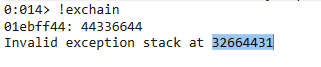
Never forget to add the final padding

Detect BadChars
badchars = ( |
P/ P/ R/
Next step is to find the pop r32; pop r32; ret;:
Windbg code:
.block |
Pykd:
from pykd import * |
JMP short bytes
Now, It’s time to JMP shortly to avoid invalid instructions and crash.
First when
P/ P/ R/instructions is done, You start to assemble the address using windbg: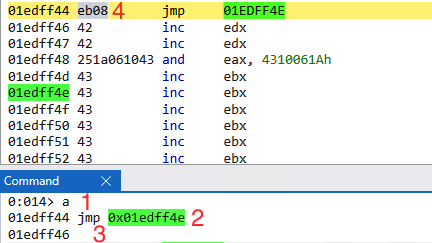
image - We use
acommmand afterretfromP/ P/ R/to assemmble a jmp instruction.
- We use
- We choose the address we want to jump to
jmp 0xaddress.
- We choose the address we want to jump to
- Press Enter to assemble
- We can see in the opcode that the
JMP 0xaddresstranslated toeb08which means Jump08bytes which is gonna jump to the address we provided (later our shellcode).
- We can see in the opcode that the
- Finally don’t forget to add 2
\x90as the address is missing 2 bytes(\xeb\x08\x90\x90).
Island Hopping
In island hopping we calcluate the length if bytes between the esp and start of our shellcode, That way when we get the value we can add it to esp/sp and elemenat it and JMP to the esp which will be indicating to our shellcode.
- steps:
Windbg> ? shellcode_address - @esp |
- Generate Opcodes
msf-metasm_shell |
We use sp to avoid null bytes
Executing shellcode
The structure of our payload would be the following
filler = b"\x41" * (size) |
Tips
- If you have a small buffer space you can do the following
- Find a register that indicates to the start of your shellcode and do use
call reginstruction orJMP reg. - Also you could use
JMPbackward or negativeJMP - Don’t forget to fill the remains bytes with
\x90for the stack aligen to avoid crashes - You can use also Island Hopping technique
- If u got a small buffer to detect badchars, Use the small buffer which fits the amount and repeat until get all badchars
- Use
narlyto identify security protections on the modules - Also you can use process hacker
Propertieson the process to check the protections and loaded modules and each protections also. - The the address of the instruction or the module contains null-byte, then do partcial overwrite for example if the address of the instruction as the following
00414E7A, then set theEIPas414E7A.
- Find a register that indicates to the start of your shellcode and do use
Egghunters
Egghunting
Manually send a dummy shellcode with an egg(dword):
dummmy = b"w00tw00t" |
then search for it all over the memory space using Windbg command:
s -a 0 L?80000000 "w00tw00t" |
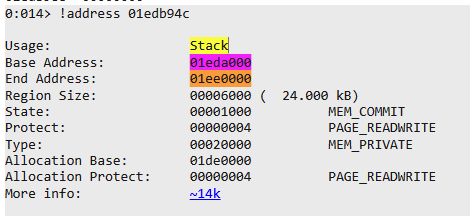
After that to detremin where our shellcode is located we can take the found address and check it:
!address your_Address |
NTAccess Egghunting
CODE = ( |
You can get the NTAccess syscall number as the following from Windbg:
u ntdll!NtAccessCheckAndAuditAlarm:
image
SEH Egghunting
CODE = ( |
Scripts
Finally You can use the following code to generate your own egg hunter:
import sys |
Running commands:
# NTACCESS |
Reverse Engineering For Bugs
Notes
- For discovering ports used by the software use
TCPView. - Check also the permission that the app is using.
- Sync IDA & Windbg.
- When you working on an app that recives data remotely set a break point on
recvAPI and start your analysis from this part. - Always dump the arguments of the functions, During the analysis.
- Make sure to go through function one by one & Check the function arguments and structure before it’s get excuted or after depending on the function.
- Always check the registers before & after executions of the functions.
- Always perform the
shiftor arithmatic or logical operatons manual to check the values. - Set a hardware breakpoint on the location that has your data to see where your data get’s accessed in the code, Instead of wasting time going through un-nessecery functions or codes.
- Take note of the static offsets that been used in the code for comperission or else.
- Remember to check out non sintaized memmcpy operations size
- Always check the offsets and how the data is handled.
- If there are any checks on the size and limit, Use negative size. And check which parts values are not checked.
Find if can overwrite the return address
- Check the destnation address of the copy operation and find if it’s within the stack
!teb: and check the range.
- Next Check the return address using the
kcommand to check the return address.
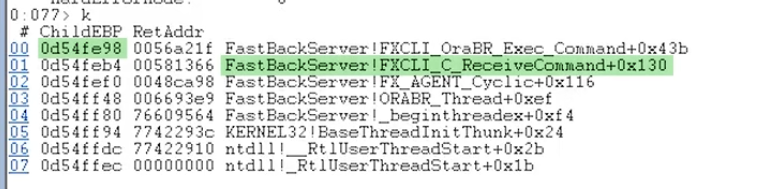
- After this check it using
ddscommmand and evaluate it to check if it’s possiable to overwrite.

- then use the destniation address and the return address to check the needed value for over write

DEP Bypass
Introduction
There are many ways to bypass DEP as the following:
VirtualAlloc(MEM_COMMIT + PAGE_READWRITE_EXECUTE) + copy memory: This will allow you to create a new executable memory region, copy your shellcode to it, and execute it. This technique may require you to chain 2 API’s into each other.HeapCreate(HEAP_CREATE_ENABLE_EXECUTE) + HeapAlloc() + copy memory: In essence, this function will provide a very similar technique as VirtualAlloc(), but may require 3 API’s to be chained together))SetProcessDEPPolicy(): This allows you to change the DEP policy for the current process (so you can execute the shellcode from the stack) (Vista SP1, XP SP3, Server 2008, and only when DEP Policy is set to OptIn or OptOut)NtSetInformationProcess(): This function will change the DEP policy for the current process so you can execute your shellcode from the stack.VirtualProtect(PAGE_READ_WRITE_EXECUTE): This function will change the access protection level of a given memory page, allowing you to mark the location where your shellcode resides as executable.WriteProcessMemory(): This will allow you to copy your shellcode to another (executable) location, so you can jump to it and execute the shellcode. The target location must be writable and executable.
Functions Requirements
VirtualAlloc()
LPVOID WINAPI VirtualAlloc( |
| Parameter | Description |
|---|---|
| lpAddress | The starting address of the region to allocate. This is the new memory location where you want to allocate memory. It might be rounded to the nearest multiple of the allocation granularity. |
| dwSize | The size of the region to allocate, in bytes. This value may need to be generated using a ROP gadget, especially if the exploit needs to avoid null bytes. |
| flAllocationType | Set to 0x1000 (MEM_COMMIT). This value might need to be placed on the stack using a ROP gadget if you cannot directly use the value in your exploit. |
| flProtect | Set to 0x40 (EXECUTE_READWRITE). Similar to flAllocationType, this value might need to be placed on the stack using a ROP gadget. |
HeapCreate()
HANDLE WINAPI HeapCreate( |
| Parameter | Description |
|---|---|
| flOptions | Options for the heap. Set to 0x00040000 (HEAP_CREATE_ENABLE_EXECUTE) to allow execution of code from the heap. |
| dwInitialSize | The initial size of the heap. This value may need to be generated using a ROP gadget or can be set to a fixed value depending on the exploit context. |
| dwMaximumSize | The maximum size of the heap. This can be set to zero to allow the heap to grow as needed. |
SetProcessDEPPolicy()
BOOL WINAPI SetProcessDEPPolicy( |
| Parameter | Description |
|---|---|
| dwFlags | Flags to set the DEP policy. Set to 0 to disable DEP for the process. Only effective when the system DEP policy is OptIn or OptOut. |
NtSetInformationProcess()
NTSTATUS WINAPI NtSetInformationProcess( |
| Parameter | Description |
|---|---|
| ProcessHandle | Handle to the process. For current process, this is typically -1. |
| ProcessInformationClass | A value from the PROCESS_INFORMATION_CLASS enumeration. To modify DEP settings, use ProcessExecuteFlags (25). |
| ProcessInformation | A pointer to a buffer containing the information to set. For DEP settings, this should point to a DWORD with the desired execute flag. |
| ProcessInformationLength | Size of the buffer pointed to by ProcessInformation. For DEP settings, this will be sizeof(DWORD). |
VirtualProtect()
BOOL WINAPI VirtualProtect( |
| Parameter | Description |
|---|---|
| lpAddress | The starting address of the region of pages whose access protection attributes are to be changed. |
| dwSize | The size of the region whose access protection attributes are changed, in bytes. |
| flNewProtect | The memory protection option. Set to 0x40 (PAGE_EXECUTE_READWRITE) to make the memory region executable. |
| lpflOldProtect | A pointer to a variable that receives the old access protection of the first page in the specified region of pages. Can be NULL if this information is not needed. |
WriteProcessMemory()
BOOL WINAPI WriteProcessMemory( |
| Parameter | Description |
|---|---|
| hProcess | A handle to the process memory to be modified. For the current process, this is typically -1. |
| lpBaseAddress | A pointer to the base address in the specified process to which data is written. |
| lpBuffer | A pointer to the buffer that contains data to be written in the address space of the specified process. |
| nSize | The number of bytes to be written to the specified process. |
| lpNumberOfBytesWritten | A pointer to a variable that receives the number of bytes transferred into the specified process. This parameter can be NULL. |
Functions skeleton
VirtualAlloc()
va = pack("<L", (0x45454545)) # dummy VirutalAlloc Address |
HeapCreate()
from struct import pack |
SetProcessDEPPolicy()
spd = pack("<L", 0x5A5A5A5A) # dummy SetProcessDEPPolicy Address |
NtSetInformationProcess()
nsip = pack("<L", 0x5D5D5D5D) # dummy NtSetInformationProcess Address |
VirtualProtect()
vp = pack("<L", 0x63636363) # dummy VirtualProtect Address |
Find a dword for lpflOldProtect
#get the .data section info first |
WriteProcessMemory()
wpm = pack("<L", 0x69696969) # dummy WriteProcessMemory Address |
Find Code Cave for your shellcode
#We need to locate the code section first |
Find a dword for lpNumberOfBytesWritten
#get the .data section info first |
Find ROP Gadgets
#rp++ |
Find Your API function address
Find IAT manually using windbg
#We first get the IAT offset |
Find the memory address
- Use
IDAto extract theIATaddress for the function. - If it has nullbytes then use the
neginstruction. - Use an instruction that get
ptrto locate theVMAof the function - example:
Function IAT = FF221111 |
Tips
- Always check the register that will backup the
espaddress, and if that register can be used in other operations. - When there is a badchars problem upu could
negor add and sub from it. - If you can’t use a gadget cause it has an instruction that could miss your
ROP, then locate if it’s behind your neccessery instructions, for example:
#gadget as the following
0x01edff4e: jmp eax; push esp; pop ecx; ret; |
- if you got gadget with
ret num:
Your gadget has to be as the following |
ASLR Bypass
Introduction
There are the Following ways to bypass ASLR:
Non-ASLR Module: Some modules that loaded or come with the software, Are not compiled withASLRprotection, Which we can use instead of the software itself or protected modules.Partial Overwrite: If we can do a partial overwrite when we find one of the vulnerabilities, TheCPUtranslate the partial address to a full address for exampel, If the current base address is1000000and we have ourJMP ESPinstruction at offset73AEif we only sent the73AEtheCPUwill translate it to a full address as the following10007AEwhich is the full address of our instruction.ASLR Bruteforcing: This method is more effective onx86as the range of the address is smaller in size than thex64_x86. this is possible on32-bitbecause ASLR provides only8 bitsof entropy. The main limitation is that this only works for target applications that don’t crash when encountering an invalidROPgadget address or in cases in which the application is automatically restarted after the crash. or Also tunning as a child process.Information leak & Logical Bugs: There are set of logical bugs & Info leak bugs that can be used to leak the address of the module, This can be done by abusing the fact that someAPIs&Functionscan be used to retrive these kind of information.
Info leakes
Most Win32 APIs do not pose a security risk but a few can be directly exploited to generate an info leak. These include the DebugHelp APIs1 (from Dbghelp.dll), which are used to resolve function addresses from symbol names. |
Bypass ASLR
#Calculate the base address |
Format Strings Vulnerabilities
Reading Permitive
| Specifier | Description | Potential Use in Vulnerability |
|---|---|---|
%s |
String | Can read arbitrary memory |
%d |
Signed decimal integer | Can leak integer values |
%u |
Unsigned decimal integer | Can leak integer values |
%x |
Unsigned hexadecimal integer | Can leak memory addresses |
%p |
Pointer (address in hexadecimal) | Can leak memory addresses |
%n |
Number of characters written so far | Can write to arbitrary memory |
%c |
Character | Can read arbitrary memory |
%f |
Floating-point number | Can leak float values |
%o |
Unsigned octal | Can leak integer values |
%e, %E |
Scientific notation (floating-point) | Can leak float values |
%g, %G |
Shortest of %e/%f or %E/%f |
Can leak float values |
%a, %A |
Hexadecimal floating-point | Can leak float values |
Writing Permitive
| Specifier | Description | Typical Use |
|---|---|---|
%n |
Writes the number of characters printed so far into the provided integer pointer. | Used in format string exploits to write values to specific memory addresses. |
%hn |
Similar to %n, but writes the number of characters into a short integer. |
Can be used to write to memory with more precision and smaller footprint. |
%hhn |
Similar to %n, but writes the number of characters into a char or unsigned char. |
Allows for even more precise control over the writing of memory, often used in tight memory spaces. |
%ln |
Similar to %n, but writes the number of characters into a long integer. |
Useful for architectures or situations where long is the preferred or necessary data type. |
%lln |
Similar to %n, but writes the number of characters into a long long integer. |
Applicable for 64-bit systems where long long is used to address larger memory spaces. |
Exploiting
ASLR Bypass
# ASLR Bypass senario |
Stack Pivoting
| Gadget Type | Description | Common Assembly Instruction(s) | Use in Stack Pivoting |
|---|---|---|---|
| Stack Adjustment | Adjusts the stack pointer (often to bypass stack-based protections). | add esp, [value] ; ret |
Used to move the stack pointer to a controlled area, like a buffer filled with the next stage of the exploit. |
| Indirect Jump | Changes the instruction pointer based on a stack value. | pop eip; ret |
Allows for a jump to a controlled memory address, useful for redirecting execution flow to attacker-controlled code. |
| Indirect Call | Similar to indirect jump but uses call instruction. | call [esp + offset] |
Utilized to call a function or a gadget with a parameter set up by previous gadgets. |
| Stack Pivot | Directly modifies ESP to point to a different memory location. | xchg eax, esp;ret, mov esp, ebp; pop ebp; ret |
Primary gadget for pivoting the stack to a new location, like a heap buffer containing more ROP gadgets or shellcode. |
| NOP/Slide | Sequence of no-operation instructions. | nop |
Used to align the stack or create a ‘slide’ to ensure reliable execution of subsequent gadgets. |
Links
- https://axcheron.github.io/exploit-101-format-strings/
- https://cs155.stanford.edu/papers/formatstring-1.2.pdf
- https://www.exploit-db.com/docs/english/28476-linux-format-string-exploitation.pdf
Practicing
DEP Bypass
- Sync Breeze |
ASLR
- FastBackServer |
CVE-2023-33720 mp4v2 v2.1.2 was discovered to contain a memory leak via the class MP4BytesProperty. |
Shellcoding
- Reverse Shell ( Optomized ) |
Format Strings
- https://www.exploit-db.com/exploits/51259 |
Reverse Engineering
- Extra Miles |